I might do something with it after the dinit experiment.
I want go look at X11 alternatives … not Wayland , older simpler things.
We may have to compile dinit.
It might help if all packages are compiled the same way.
Gentoo Apps !!
sys-apps/dinit
sys-apps/dinit-service-manager
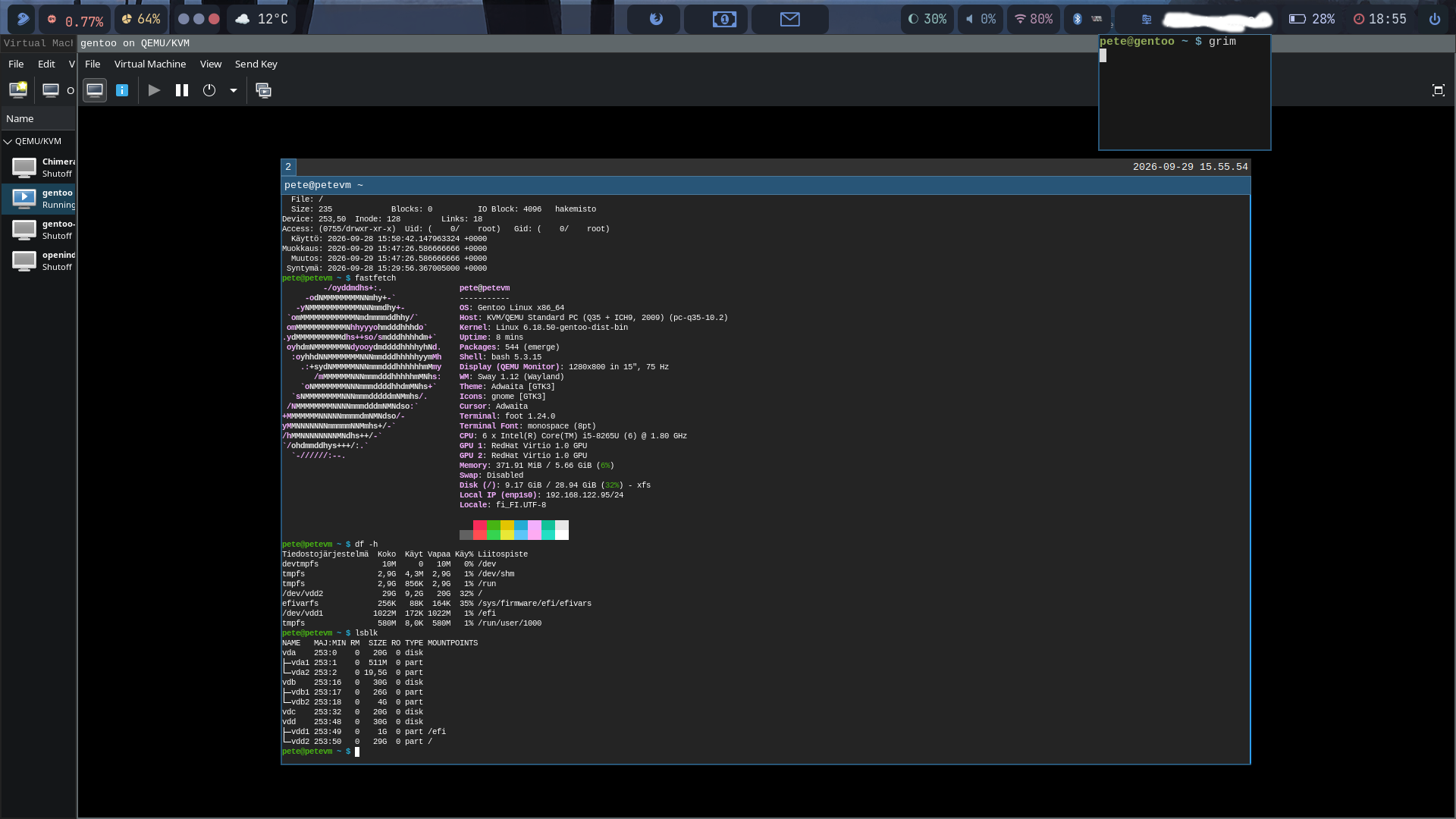
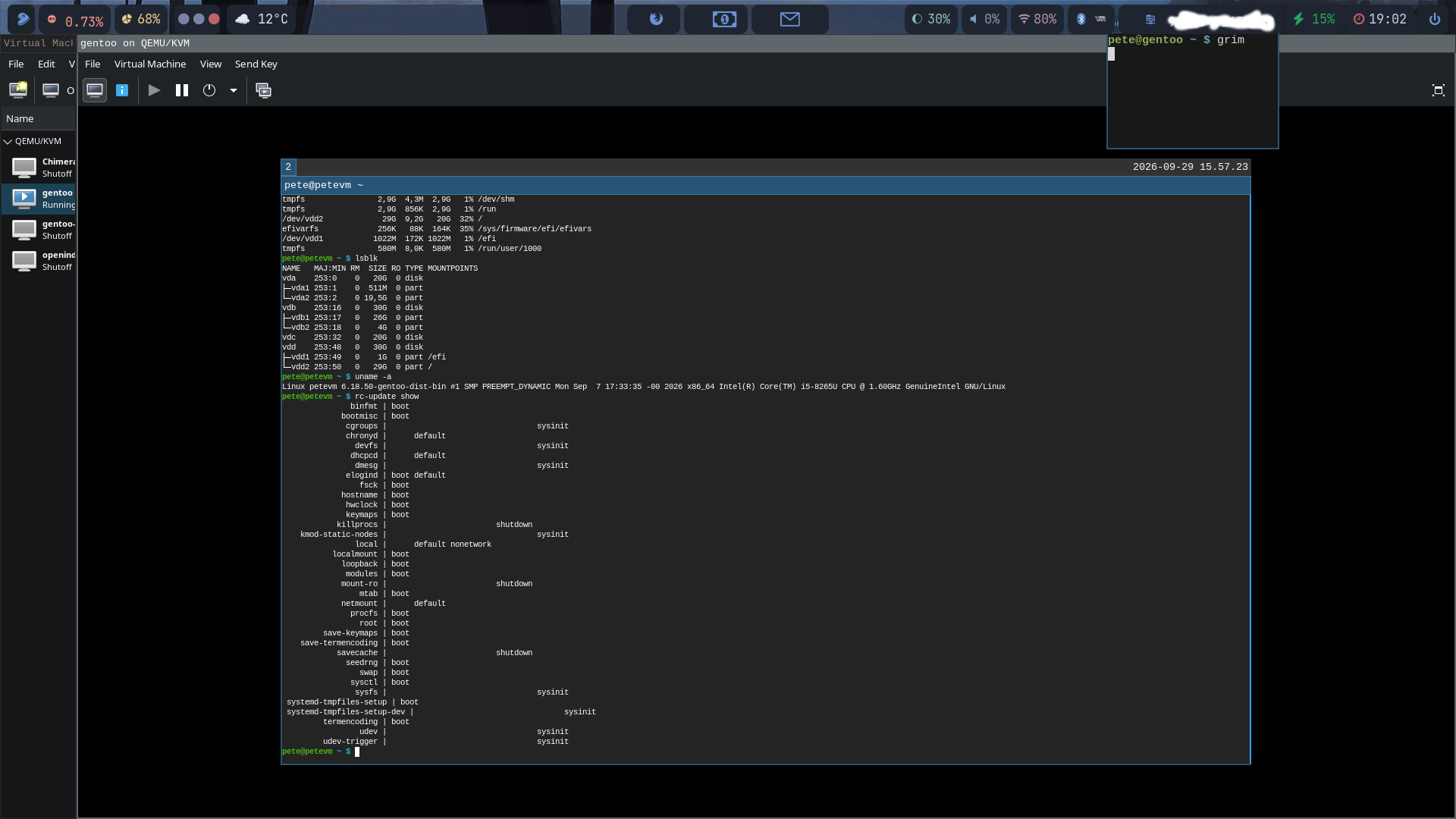
Yes, my gentoo/dinit will be different to yours, and Daniel’s.
That is what Gentoo is all about… extending distrowatch to infinity.
I have another problem
I cant get past the install firmware step
emerge --ask sys-kernel/linux-firmware
It says /var/cache/distfiles is full
I removed everything in /var/cache/distfiles
Tried again → same
I think it should be using the virtual disk /dev/vda3 , but it looks like it is using ram disk.
I came out of chroot at one stage … maybe I forgot to mount /mnt/gentoo to /dev/vda3 before re-entering chroot. ?
I had /dev/vda1 … the efi partiton mounted to /mnt/gentoo/boot /efi … maybe that masked the mount of /dev/vda3 to /mnt/gentoo?
So where should I mount the EFI partiton ?
OK, tell me all the steps you have taken!! It sounds like you may not have mounted all necessary files!! Why do you have this topic as being marked as solved? The first thing I need to know is how your virtual disk is partitioned!!
Three partitoons
/dev/vda1 efi 1Gb fat32
/dev/vda2 swap
/dev/vda3 / 40Gb ext4
Did you remember this:
Copy DNS info
One thing still remains to be done before entering the new environment and that is copying over the DNS information in /etc/resolv.conf. This needs to be done to ensure that networking still works even after entering the new environment. /etc/resolv.conf contains the name servers for the network.
To copy this information, it is recommended to pass the --dereference option to the cp command. This ensures that, if /etc/resolv.conf is a symbolic link, that the link’s target file is copied instead of the symbolic link itself. Otherwise in the new environment the symbolic link would point to a non-existing file (as the link’s target is most likely not available inside the new environment).
cp --dereference /etc/resolv.conf /mnt/gentoo/etc/
and if you followed the handbook:
efi partition: /mnt/gentoo/efi
root partition: /mnt/gentoo
Is /dev/vda3 mounted as /mnt/gentoo and then cd /mnt/gentoo or as @ihasama is saying and you then download the stage3 file!!
That is still a problem
One mount will mask the other
I did use /mnt/gentoo/boot/efi … but I dont think that caused this problem
Yes , I remembered the DNS bit
I will have to check the order … it is late and I am on the tablet.
I downloaded the stage3 file first, but I am not sure if I had the mount of /dev/vda3 when I unpacked it.?
Then you have no /var!!
It is inside /
Do you mean I need /var on a separate partition?
Wait till I check tomorrow.
I think it may be because I came out of chroot and went in again … maybe the mount got lost.?
What should I see in a df inside the chroot?
That is not the default any more.
mnt/gentoo/efi is the preferred for UEFI. It shouldn’t affect to your issues though. Maybe you did untar the stage to wrong place and you should move the files to /mnt/gentoo.
I don’t have a df of my chroot but finished install’s df is shown in my picture few messages ago.
Not until you do the tar xpvf stage3-.tar.xz --xattrs-include='.*’ --numeric-owner -C /mnt/gentoo !!
Gentoo Command Order
cd /mnt/gentoo
date MMDDhhmmYYYY syntax Month, Day, hour, minute and Year
links Downloads – Gentoo Linux (Downloads the Stage3 File, choose wisely)
tar xpvf stage3-.tar.xz --xattrs-include='.*’ --numeric-owner -C /mnt/gentoo
nano /mnt/gentoo/etc/portage/make.conf
cp --dereference /etc/resolv.conf /mnt/gentoo/etc/
mount --types proc /proc /mnt/gentoo/proc
mount --rbind /sys /mnt/gentoo/sys
mount --make-rslave /mnt/gentoo/sys
mount --rbind /dev /mnt/gentoo/dev
mount --make-rslave /mnt/gentoo/dev
mount --bind /run /mnt/gentoo/run
mount --make-slave /mnt/gentoo/run
chroot /mnt/gentoo /bin/bash
source /etc/profile
export PS1=“(chroot) ${PS1}”
mount /dev/sda1 /efi
emerge-webrsync
mkdir /etc/portage/repos.conf
cp /usr/share/portage/config/repos.conf /etc/portage/repos.conf/gentoo.conf
cat /etc/portage/repos.conf/gentoo.conf
emerge --sync
this is for my vm info for my use only, I need to have it here (sorry) for trouble shooting when there’s issues with dinit. Ill try it today and will follow the wiki page Dinit - Gentoo Wiki
pete@petevm ~ $ rc-update show -v
agetty |
binfmt | boot
bluetooth |
bootlogd |
bootmisc | boot
cgroups |                                 sysinit
chronyd |      default
consolefont |
cupsd |
dbus |
devfs |                                 sysinit
device-mapper |
dhcpcd |      default
dmcrypt |
dmesg |                                 sysinit
elogind | boot default
fsck | boot
fuse |
gpm |
hostname | boot
hwclock | boot
ip6tables |
iptables |
keymaps | boot
killprocs |                        shutdown
kmod-static-nodes |                                 sysinit
local |      default nonetwork
localmount | boot
loopback | boot
metalog |
modules | boot
mount-ro |                        shutdown
mtab | boot
net-online |
net.lo |
netmount |      default
nullmailer |
numlock |
osclock |
pciparm |
procfs | boot
pydoc-3.14 |
root | boot
rsyncd |
runsvdir |
s6-svscan |
save-keymaps | boot
save-termencoding | boot
savecache |                        shutdown
seedrng | boot
sshd |
swap | boot
swclock |
switcheroo-control |
sysctl | boot
sysfs |                                 sysinit
systemd-tmpfiles-setup | boot
systemd-tmpfiles-setup-dev |                                 sysinit
termencoding | boot
udev |                                 sysinit
udev-settle |
udev-trigger |                                 sysinit
user |
user.pete |
pete@petevm ~ $ ls -l /etc/runlevels/boot /etc/runlevels/default
/etc/runlevels/boot:
yhteensä 0
lrwxrwxrwx 1 root root 18 27. 9. 17:21 binfmt → /etc/init.d/binfmt
lrwxrwxrwx 1 root root 20 27. 9. 17:21 bootmisc → /etc/init.d/bootmisc
lrwxrwxrwx 1 root root 19 29. 9. 15:09 elogind → /etc/init.d/elogind
lrwxrwxrwx 1 root root 16 27. 9. 17:21 fsck → /etc/init.d/fsck
lrwxrwxrwx 1 root root 20 27. 9. 17:21 hostname → /etc/init.d/hostname
lrwxrwxrwx 1 root root 19 27. 9. 17:21 hwclock → /etc/init.d/hwclock
lrwxrwxrwx 1 root root 19 27. 9. 17:21 keymaps → /etc/init.d/keymaps
lrwxrwxrwx 1 root root 22 27. 9. 17:21 localmount → /etc/init.d/localmount
lrwxrwxrwx 1 root root 20 27. 9. 17:21 loopback → /etc/init.d/loopback
lrwxrwxrwx 1 root root 19 27. 9. 17:21 modules → /etc/init.d/modules
lrwxrwxrwx 1 root root 16 27. 9. 17:21 mtab → /etc/init.d/mtab
lrwxrwxrwx 1 root root 18 27. 9. 17:21 procfs → /etc/init.d/procfs
lrwxrwxrwx 1 root root 16 27. 9. 17:21 root → /etc/init.d/root
lrwxrwxrwx 1 root root 24 27. 9. 17:21 save-keymaps → /etc/init.d/save-keymaps
lrwxrwxrwx 1 root root 29 27. 9. 17:21 save-termencoding → /etc/init.d/save-termencoding
lrwxrwxrwx 1 root root 19 27. 9. 17:21 seedrng → /etc/init.d/seedrng
lrwxrwxrwx 1 root root 16 27. 9. 17:21 swap → /etc/init.d/swap
lrwxrwxrwx 1 root root 18 27. 9. 17:21 sysctl → /etc/init.d/sysctl
lrwxrwxrwx 1 root root 34 27. 9. 17:21 systemd-tmpfiles-setup → /etc/init.d/systemd-tmpfiles-setup
lrwxrwxrwx 1 root root 24 27. 9. 17:21 termencoding → /etc/init.d/termencoding

/etc/runlevels/default:
yhteensä 0
lrwxrwxrwx 1 root root 19 28. 9. 19:02 chronyd → /etc/init.d/chronyd
lrwxrwxrwx 1 root root 18 28. 9. 18:58 dhcpcd → /etc/init.d/dhcpcd
lrwxrwxrwx 1 root root 19 29. 9. 15:17 elogind → /etc/init.d/elogind
lrwxrwxrwx 1 root root 17 27. 9. 17:21 local → /etc/init.d/local
lrwxrwxrwx 1 root root 20 27. 9. 17:21 netmount → /etc/init.d/netmount
I just did the dinit switch! It was quite easy, I followed the gentoo wiki Dinit - Gentoo Wiki to this point emerge --ask sys-apps/dinit and rebooted. My user has .bash_profile to start Sway automatically and it didn’t work so I logged in as root and needed to start and enable these init services:
dbus
seatd (also added my user to seatd group)
dhcpcd
chronyd
AND remove elogind
every service needs a file in /etc/dinit.d/ which is basicly this kind:
/etc/dinit.d/chronyd
type = process
cummand = /usr/sbin/chronyd -d
before = login.target
This is my first time using Dinit so I don’t know anything else. I just checked which services were up with OpenRC and enabled those to get the system running. I haven’t tested anything else but sway works, foot works and Firefox works. Please note after reboot the vm didn’t have internet connection. I needed to first enable the dhcpcd service. Anyways, here’s a screenshot of my VM in use.
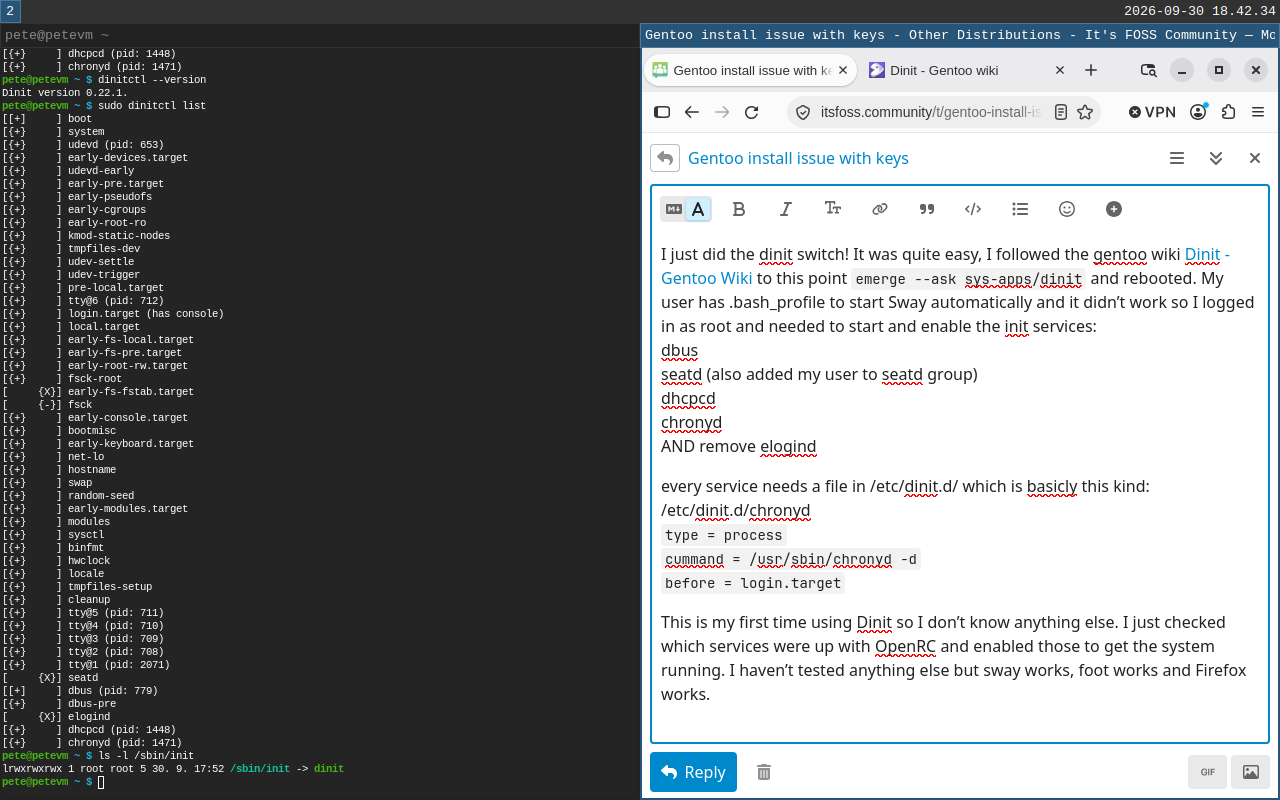
Yours shows / and /efi. Mine showed neither …I was working in ram disk.
So I got the mounts wrong . Will investigate
Will compare.
Did it remove OpenRC, or can you move the init link back to OpenRC?
You have mastered dinit … there is not much more to learn … it is really simple.
You can find dinit service files in Artix or antiX on their github sites.
Here is my scrappy hand-log/command order
-
Create and Configure the Virtual Machine
Allocate sufficient resources: at least 4 to 8 CPU cores, 8 GB of RAM (more is better for compiling), and at least 50 GB to 100 GB of virtual hard disk space.
Enable UEFI support in your VM settings if preferred, or use standard Legacy/BIOS booting.
Download the Gentoo Minimal Installation ISO and load it into the VM -
Boot and Prepare the Disks
Start the VM from the ISO. Press F1 if needed at the boot prompt, then select the default kernel.
Check network connection using ping. DHCP should automatically assign an IP address.
Partition your virtual disk (e.g., /dev/sda) using fdisk or parted:
Boot/EFI partition: ~1 GB (FAT32 if UEFI).
Swap partition: 2 GB to 4 GB (optional depending on RAM).
Root partition: The remainder of the drive (EXT4).
Format and mount the filesystems:
bash
mkfs.ext4 /dev/vda3
mkfs.fat -F32 /dev/vda1  # If using UEFI
mkswap /dev/vda2 && swapon /dev/sva2
mkdir -p /mnt/gentoo
mount /dev/vda3 /mnt/gentoo
Query : cant do mount /dev/vda1 /mnt/gentoo/boot/efi
Ans: That is wrong … do the efi mount after chroot.
-
Install the Stage 3 Tarball and Chroot
Date and time check: ensure system clock is accurate.
Navigate to the mount point and download a Stage 3 tarball (OpenRC or systemd) using links or wget:
wget https://mirror.aarnet.edu.au/pub/gentoo/releases/amd64/autobuilds/current-stage3-amd64-openrc/
cd /mnt/gentoo
# Use links or wget to fetch the latest stage3 archive from a mirror
tar xpf stage3-*.tar.xz --xattrs-include='*.*' --numeric-owner

Use code with caution.
Configure compilation options in /mnt/gentoo/etc/make.conf
COMMON_FLAGS=“O2 -pipe”
and adjust MAKEOPTS
MAKEOPTS=“-j8”
Copy DNS info
cp --dereference /etc/resolv.conf /mnt/gentoo/etc
Mount the necessary pseudo-filesystems and chroot into the new environment:
mount --types proc /proc /mnt/gentoo/proc
mount --rbind /sys /mnt/gentoo/sys
mount --make-rslave /mnt/gentoo/sys
mount --rbind /dev /mnt/gentoo/dev
chroot /mnt/gentoo /bin/bash
source /etc/profile
-
Configure, Compile, and Install the Kernel
Synchronize your Portage tree and select your system profile:
emerge-webrsync  # or emerge --sync
eselect profile list
eselect profile set <profile_number>

Set timezone and configure locales (/etc/locale.gen followed by locale-gen).
 Edit /etc/timezone
 Set to Australia/Sydney

Set date
  date -s "2026-09-28 21:19:00"
  NB .... have to reset it every time restart the VM

Set up make.conf
1
These settings were set by the catalyst build script that automatically
built this stage.
Please consult /usr/share/portage/config/make.conf.example for a more
detailed example.
COMMON_FLAGS="-march=haswell -O2 -pipe"
CFLAGS="${COMMON_FLAGS}"
CXXFLAGS="${COMMON_FLAGS}"
FCFLAGS="${COMMON_FLAGS}"
FFLAGS="${COMMON_FLAGS}"

NOTE: This stage was built with the bindist Use flag enabled

This sets the language of build output to English.
 Please keep this setting intact when reporting bugs.
LC_MESSAGES=C

MAKEOPTS="-j4"
#CHOST="x86_64-pc-linux-gnu"
CPU_FLAGS_X86="mmx mmxext sse sse2"
#ACCEPT_LICENCE="*"

ACCEPT_LICENsE="@FREE @BINARY-REDISTRIBUTABLE"

GENTOO_MIRRORS="https://mirror.aarnet.edu.au/pub/gentoo/"

GRUB_PLATFORMS="efi-64 pc"
INPUT_DEVICES="evdev keyboard mouse synaptics libinput"
VIDEO_CARDS="intel"
ACCEPT_KEYWORDS="amd64"
USE="bindist X alsa pulseaudio pam ssl tcpd png openmp lapack -systemd"
#CFLAGS="${CFLAGS} -fopenmp -lopenblas"
#LDFLAGS="${LDFLAGS} -fopenmp -lopenblas"
CPU flags X86
emerge --ask --oneshot app-portage/cpuid2cpuflags
cpuid2cpuflags
echo "*/* $(cpuid2cpuflags)" > /etc/portage/package.use/00cpu-flags
Video_cards
edit /etc/portage/package.ise/00-video_cards
add the line
*/* VIDEO_CARDS: -* amdgpu radeonsi
Update @world
emerge --ask --verbose --update --deep --changed-use @world
Note for -j8 it meeds 16Gb of ram to compile.
Timezone
ls -l /usr/share/zoneinfo
ln -sf ../usr/share/zoneinfo/Australia/Sydney /etc/localtime
Configure locales:
edit /etc/locale-gen
uncomment en-AU

locale-gen
Set system-wide locale settings:
eselect locale list
eselect locale set 2
chooses C.UTF-8

env-update && source /etc/profile && export PS1="(chroot) ${PS1}"
Install firmware and microcode:
emerge --ask sys-kernel/linux-firmware

insufficient space in /var/cache/distfiles

emerge --ask app-portage/gentoolkit
eclean-dist --deep --pretend
eclean-dist --deep
If that doesnt work, delete stuff in /var/cache/distfiles by hand
emerge --ask sys-firmware/intel-microcode
Configure the kernel installer:
echo "sys-kernel/installkernel dracut grub" >> /etc/portage/package.use/installkernel
for grub users
Install the Linux kernel:
For a fast installation in a VM, use the pre-built binary kernel package:
Install the tool:
emerge --ask sys-kernel/installkernel
Install binary kernel:
emerge --ask sys-kernel/gentoo-kernel-bin
Verify and update bootloader:
grub=mkconfig -o /boot/grub/grub.cfg
Reboot into new binary kernel:
-
System Configuration and Bootloader
Configure /etc/fstab with your partition UUIDs or device names for automated mounting.
Set a root password using passwd.
Install essential system tools, a DHCP client (like dhcpcd), and a system logger.
Install and configure GRUB as your bootloader:
    emerge --ask sys-boot/grub
    grub-install /dev/sda
    grub-mkconfig -o /boot/grub/grub.cfg
Exit the chroot environment (exit), unmount everything (umount -l /mnt/gentoo/dev{/shm,/pts,}…), and reboot your VM into your fresh Gentoo installation.
It is essentially the same as yours, except I tried, and failed , to do the efi mount before going into the chroot.
I did exit the chroot early in the process, to fix a forgotten bind mount, and I think that is where the trouble occured.
I think I will start again from scratch … I want to increase the size of ram and VD. … and add the efi mount inside chroot…
Now I know what the df inside chroot should look like, I will check before proceeding.
Thanks.