I already uninstalled/reinstalled it through the Software Manager but still it doesn’t open. I usually launch it through Ctrl+Alt+T but that no longer works nor clicking on the item in the Menu. Xterm does work. Any hints? Am I the only one having this problem?
Are you running Gnome DE, or just using Gnome terminal in another DE?
If the latter, you may have some essential gnome package missing.
Try starting gnome terminal by typing its name at the CLI … it may give some helpful error message.
Try ldd <path to gnome terminal binary> it will tell you which libraries it needs… check they are all present
There may be a locale problem. Try sudo dpkg-reconfigure locales
You can make Xterm a lot better by editing .Xresources file… eg add a scrollbar.
I would not have thought about this, but Copilot suggested it and it does make sense, I think.
LMDE 7 is based on Debian 12, and one very common failure mode after an upgrade is a broken locale configuration. When LANG or LC_* variables point to a locale that isn’t actually generated on the system, gnome-terminal refuses to start, while xterm still works — exactly the symptoms described.
Here’s what the user should try from xterm:
1. Check current locale
Code
locale
If anything shows as UTF-8 but not fully defined (e.g., LANG= empty, or LC_ALL unset), that’s a red flag.
2. Reconfigure locales
Code
sudo dpkg-reconfigure locales
Then:
Select en_US.UTF-8 UTF-8 (or their preferred locale)
Set en_US.UTF-8 as the default
3. Apply the new locale
Code
source /etc/default/locale
4. Try launching gnome-terminal again
Code
gnome-terminal
If it launches from xterm, the keyboard shortcut and menu entry will work again after logging out and back in.
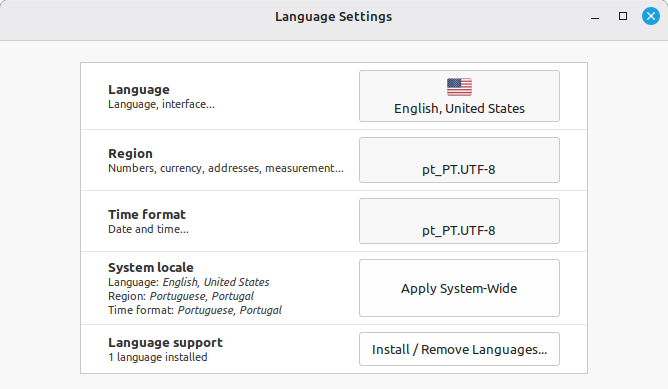
Thank you for the suggestion. Unfortunately setting en_US.UTF-8 as the default returns error “locale: Cannot set LC_ALL to default locale: No such file or directory UTF-8”
You may need to install some more locale languages.
I managed to fix it using the reconfigure locales command, but had to switch to terminal mode (Ctrl+Alt+F1). Running the command from Xterm in a windowed desktop does not work.
Thank you both for the suggestions!
One small detail (and one of the main reasons I don’t use AI): it will make up facts and present them as knowledge. LMDE 7 is based on Debian 13 (not 12). It was not relevant for the problem but it is worrying that AI makes up facts and writes them in an assertive way.
Thank you @pdecker for your help! Your hints allowed me to get to the solution!
It is worrying . It should have been able to get that simple fact correct
That is strange. ?
Maybe Xterm locks something while it is running?
Thanks for the feedback.
I had something similar but removed all the languages except american english. Ran a system update, then installed uk english, 2 french languages (not sure why as I thought there was only one, set the défaut to uk english, removed american and one french. Then changed all settings to french.
Several times it asked me to install or removed.
Everything then was fine.
But I did it all through the GUI as did not know the command line to use
Also many system updates.
Then of course had to update libreoffice.
I think Canadian French is a bit different from Parisian French… like Brazilian and Portuguese.
Very much so, I went to a quiz night run by a french Canadian. He had a list of french Canadian words and most taking part were totally lost. Paris just has a funny accent ! My wife was born and lived most of her life in the Charente Maritime region she uses words that are different to where we live now as our new region has a mix of catalan and occitan words.
Should ask, do you know why ?
It’s to confuse the English invaders !
Try greating a french person at 18h00, you say Bonsoir, they reply bonjour, so the next one you meet you say bonjour they reply Bonsoir…… they know you are English! Ha ha ha
It is strange that .au does not have regional language variations in English. It does have variations in Indigenous languages.
I guess these things take time and due consideration.
We have areas that say ‘pop’ and others that say ‘soda’. There is that type of variation. My evening meal is ‘supper’ and other areas have ‘dinner’.
There is a New York accent, a Boston accent, a Chicago accent, a southern accent, and probably more. In Iowa we don’t really have an accent. News casters go to school to learn to speak like Iowans, so everyone can understand them.
I assume almost every country has some variations like those. Australia is pretty large so it seems like it should.
Is different to a language. Catalan is a language , ok its roots are Latin and some French words are shared.
Yorkshire is a dialect, everyone says I have a funny accent when speaking French, but I explain that it’s them who talk funny not me !
Not that I can detect.
People who come here, even Americans, lose their accent over time.
…even accent was double wrong, the accent is the (slight) variation in how words are pronounced or certain sounds.
Dialect is the thing probably meant by accent, it is the same language but with slight differences even in grammar.
And yes, Catalan is a separate language. (Just like Occitan btw. or Frisian in the Netherlands, or Gaelic in Britain)
(Dialects often are much older than standard languages, not a changed form of it, actually the standard is the newest dialect)
Minor point accents and dialect are different.
Accents are the way a word is said in language but also an accent is the added part to a letter such as ééêė çć in french but other European countries use other accents
Dialect is totally different for example from yorkshire
I’ve got nowt to do today …. I have nothing to do today where nothing is converted to nowt.
Easy conversion
But the following
Are’y reet? Dafteth Apeth. Ee, stop yer faffing about, lass
Are you OK ?
Stupid person
We use words that are in the Yorkshire dictionary to replace english words and also use an accent. Then it becomes a dialect.
Have a look at
there is a thing called antonyms, which are words spelled the same with another definition/meaning. You probably speak with a British accent and most others here with an American accent. … Linguistic is another big hobby of mine next to computers and history… and chess
No Yorkshire ! Born and bred, no such thing as British accent, try visiting Birmingham Bradford newcastle you would understand very little of what is being said it used to be the BBC were correct but no longer.
Same in france with the different regions