In Garuda Linux, the default web browser is FireDragon, which is a fork of floorp which in turn is based on Firefox, and as I’ve just learned today is developed and maintained by Garuda - my GNU/Linux distribution of choice!
I learned this when I decided to see if there is a Windows version of the browser, because I’ve been enjoying using it in Garuda. I learned this from the results of my FireDragon web browser Internet search. The first listed search result was Introduction - FireDragon browser. Further down the list of search results was a link to FireDragon’s GitHub page, listed as garuda-linux/firedragon: A Floorp fork with custom … which in turn has a link to their releases. page on GitLab, at the bottom of the page where I found that there is a download listing for Dr460nized / Windows / x64 with a link to its right - firedragon-v12.9.1-win32-x64.exe..
Of course I immediately downloaded the installer and installed it and it’s as nice to use in Windows as it is on Garuda. To learn more about FireDragon, see FireDragon’s introduction page (linked above).
I tried 4 or 5 time to install Garuda on my computer and i tried diffrent versions but i dont even come to the live desk,i click on install garuda and it starts to load and it keeps loading for over 6 min then i get an error . its a shame i would realy like to try it.
It may have a driver problem for your graphics or some other important component.
Does the installer have a ‘safe video’ option?
Are you using UEFI boot …it may not work with legacy.?
Do you have the correct version for your architecture?
it has two options install with open nividia drivers or proprieti “im not sure if i spell this word right” drivers i have tried both and the same thing happens.yes i have uefi and dissabled secure boot
i have geforce rtx 5070ti 16gb vram and 1 TB nvme ssd disk and ryzen 7 9800,so yes i have what it takes. and i was on thier discord server and showd my pictures and nobody know what was wrong
Last time I distrohopped - I tried Garuda for a couple of days - I didn’t like how it had different automated things (that I didn’t start) running at the same time - some in terminal windows - and looked to be trying to do similar things?
When was that? 2021? 2022? Anyway - it felt a bit rough around the edges - and maybe not all the developers were on the same page? Things may have improved - but I was less than impressed and re-formatted and installed something else - maybe Fedora (which I ran for about 6 weeks)…
If I was going to run an “Arch” based distro, it would probably be Arch itself, or Manjaro… Haven’t tried CachyOS (I believe you have @cat-man ?). I may actually give CachyOS a test drive in KVM (virt-manager)… I have cachyos-desktop-linux-241110.iso in my Linux ISO collection - but I see the latest is 26xxxxx - getting it now…
But I reckon I’ll stick with LTS Ubuntu for the time being - i.e. 24.04.4…
Yes i have cachyos and i like it very much i use it with Kde plasma and its great for gaming. I want to try manjaro also but i will wait for now ,some devs are not happy the way manjaro is going and they write a manifest on thier forum.
That dracut message is a fairly common boot error.
It means the initramfs can not find the named disk partition which is presumably the partition which is to be the root filesystem.
It is using by-label to identify the partition … that is unusual .
This is booting a live iso, …correct?
You need to press ‘e’ when at that boot line in grub, then edit the boot sequence … but I dont know what to tell you to change ??? … I have never had that problem booting a live iso … it usually occurs when booting after an install.
Can you show us what you see when you press ‘e’ … it may give us a clue what to change?
I was not expecting that … it normally displays the entire boot sequence for editing
but
it has displsyed a message telling you what it wants changed. … it wants the linux and initrd lines modified.
so
we have to work out how to get into edit mode and change them ?
Are there any instructions displayed by grub?
or
are there any instructions in the install webpage?
Edits made on the grub menu with ‘e’ are temporary … they apply only to the current boot. That is OK for a live system, but if it is an install you need to get into the filesystem of the install and edit the file /etc/default/grub to change some boot parameters, and then do updafe-grub.
Thank you Neville, but i think i will wait with that i dont want mess with that when i dont know what im doing and its not the end of the world if i cant try every distro there is lol . Just now i installed pop os and will try that for a while ,but so far it seems ok.
Garuda Linux is and has been my distribution of choice for some time now - at least as long as I’ve been an It’sFOSS member. When I first started with Garuda, I installed Firefox because it’s what I’ve used with previous distributions as well as Windows, but within the past few months I’ve been giving Garuda’s default browser, FireDragon a try, and I like it a lot - so much so that I investigated and learned that there’s a Windows version too, so now I have it installed on both Windows 11 Pro 25H2 and Garuda Linux.
FireDragon has a good privacy leaning, and while privacy’s not a driving force behind the browsers I choose, it’s appreciated. It’s developed and maintained by Garuda, so it has no affiliation with any corporate entity as far as I know because Garuda is a community driven project. If you’re interested, please feel free to check it out. As far as I understand, you can download it and use it on any distribution.
I just installed it ,seems ok but a bit much links and stuff all over maybe i can remove them later ,will look in to it, otherwise it looks nice i like the colorful dragon, and now it annoys me a bit more i cant install Garuda but there is many more to check out so its ok and as arch based i do like Cachyos very much so that will do.
It just occurred to me … Which flavor of Garuda did you try? For example, when I first tried it, I used the Garuda KDE-Lite flavor. Now I’m using Garuda Mokka, but very customized.
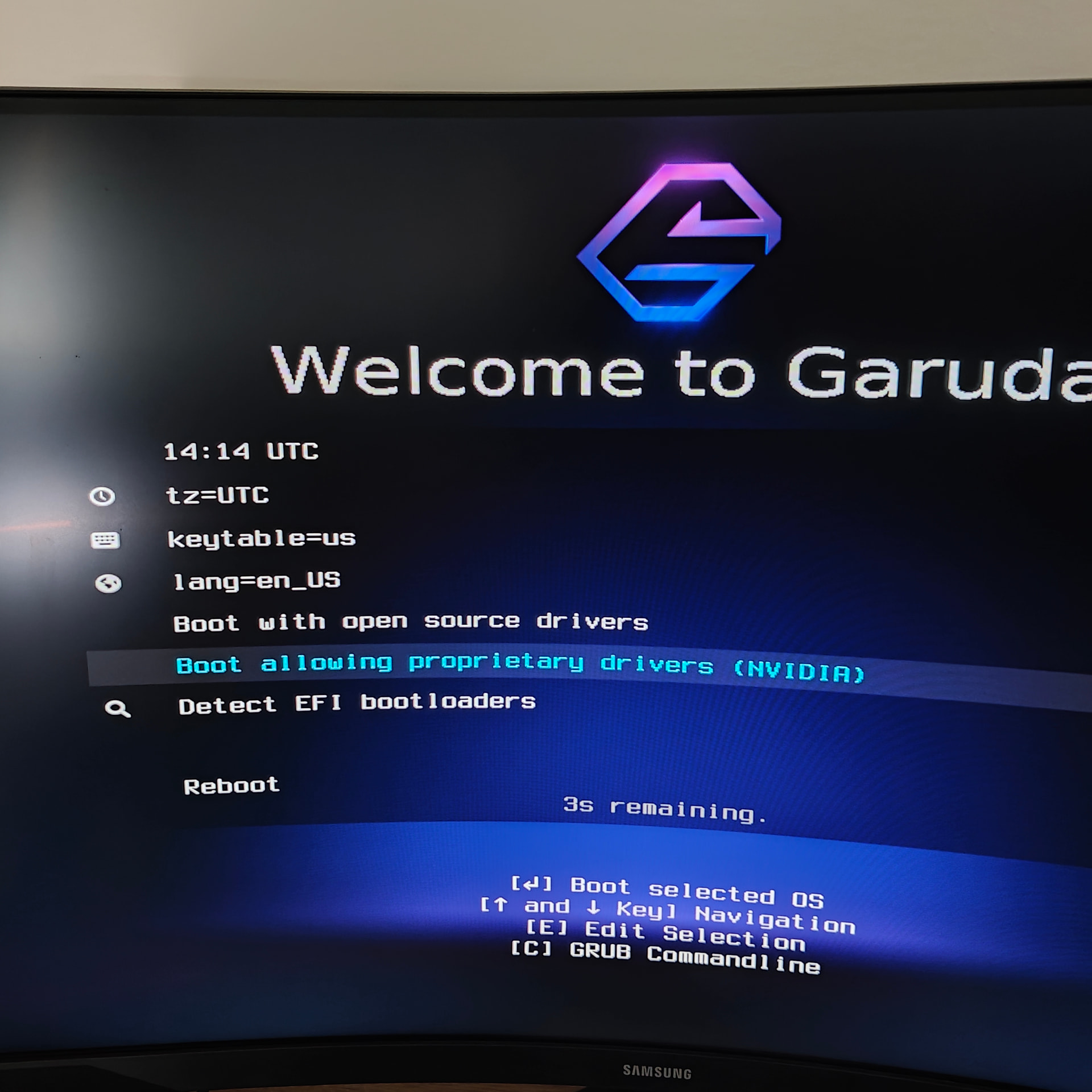
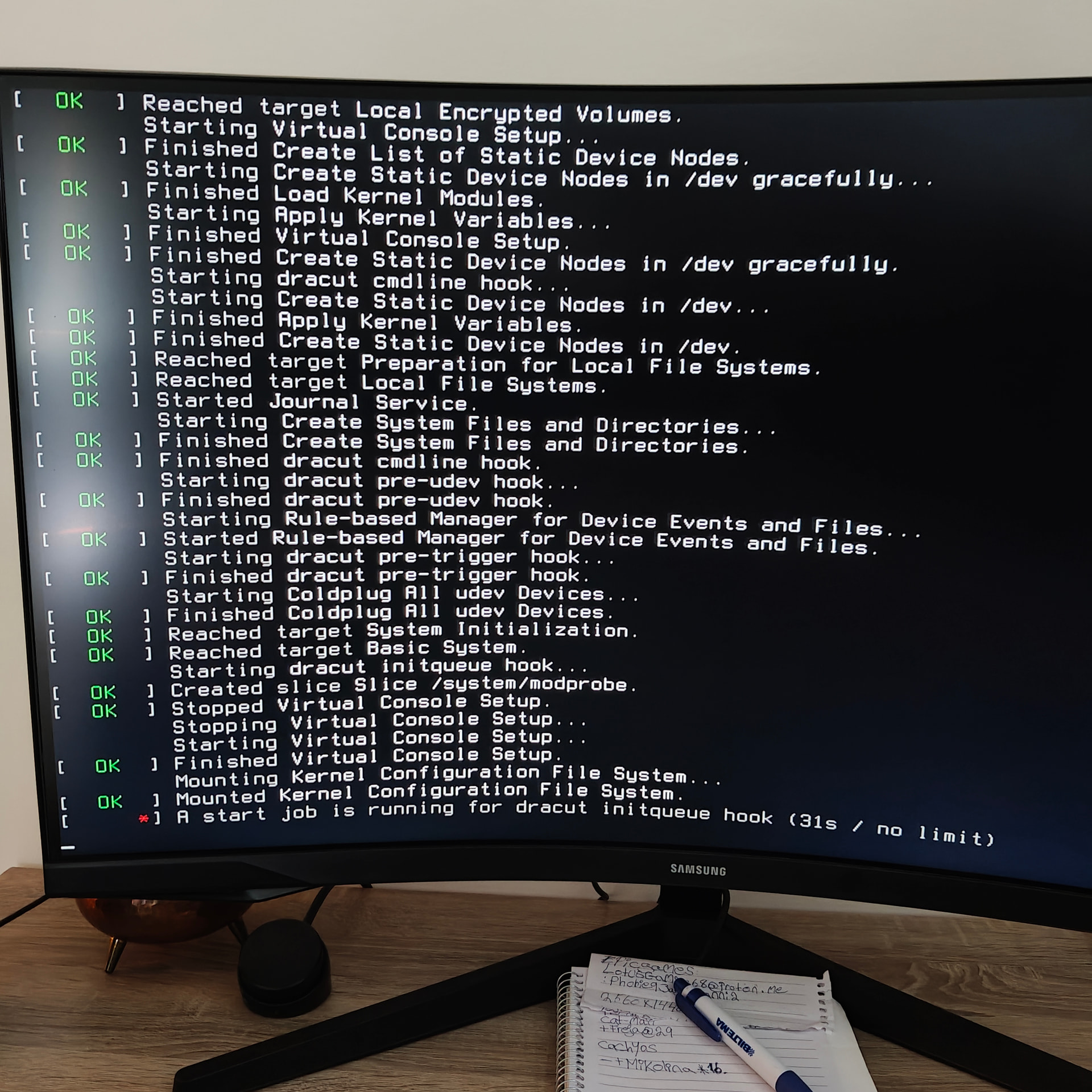
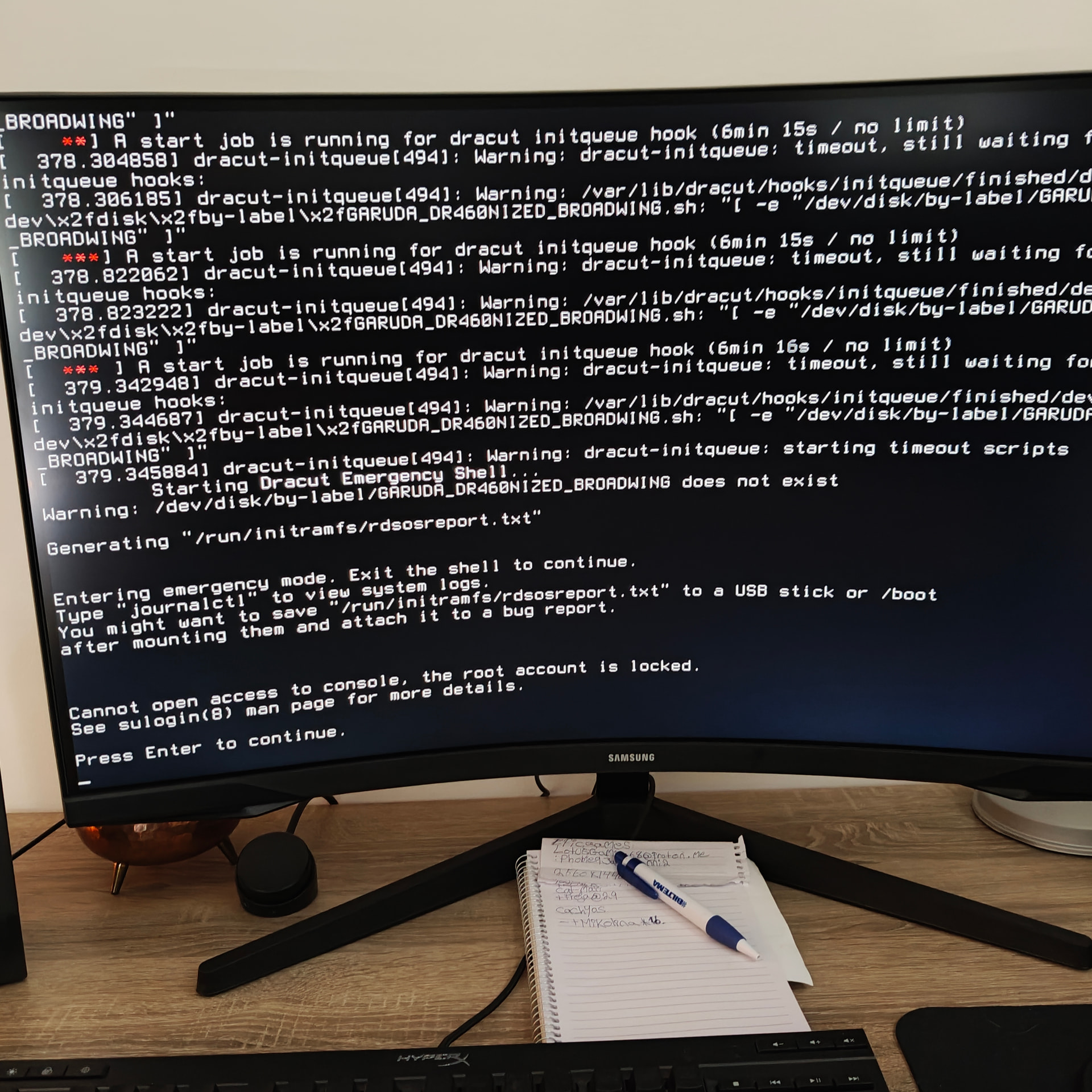
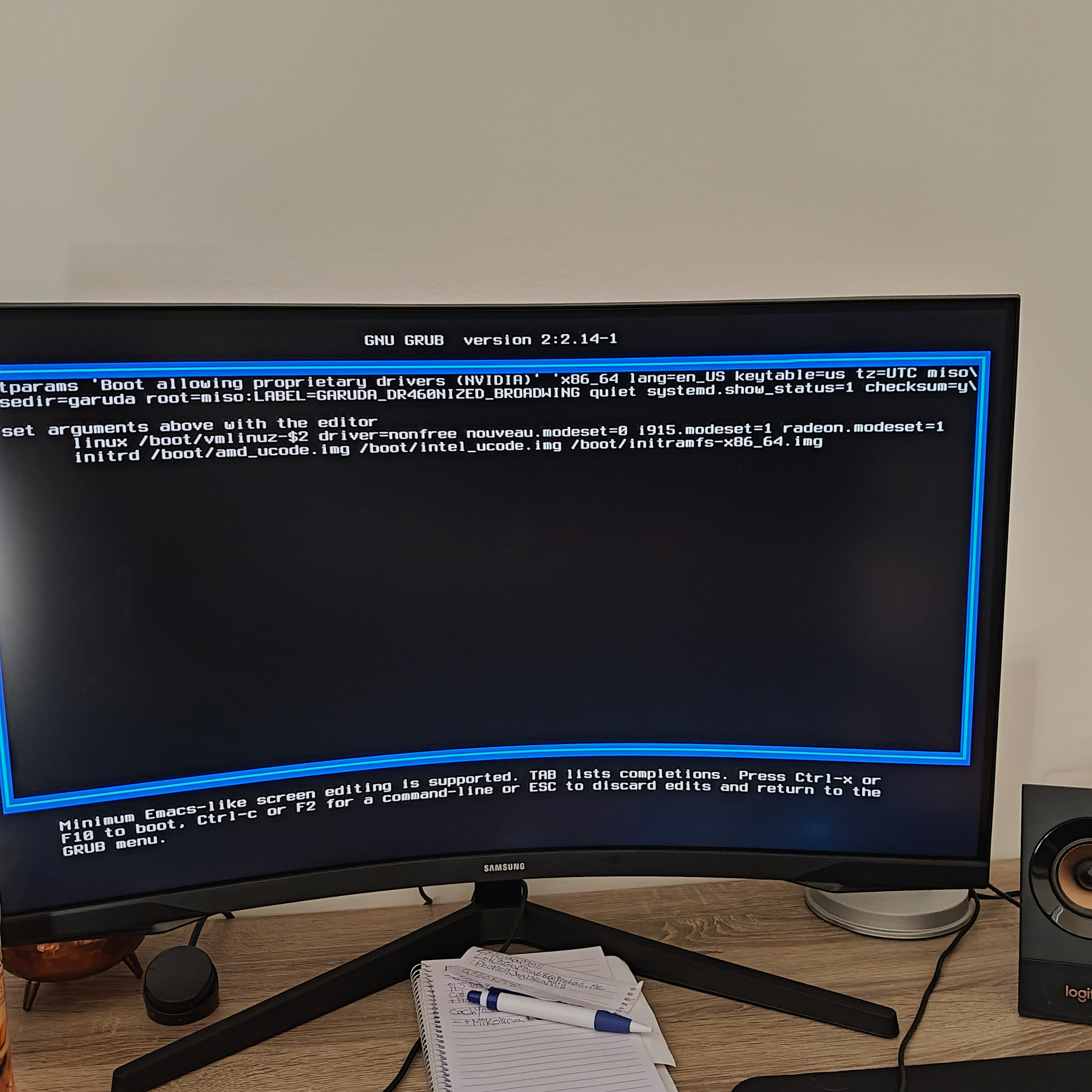
 . Just now i installed pop os and will try that for a while ,but so far it seems ok.
 but there is many more to check out so its ok and as arch based i do like Cachyos very much so that will do.