Hi, to all!
I have been dealing with updates causing boot failure on both my Linux Mint and MX computers for more than a month. I seem to have resolved Mint and I highly suspect both are due to video drivers in the updates.
But I am not sure in MX how to force the use of a specific NVIDIA driver.
After updating LM over a month ago (remotely as it was still in my home and I am at my mother’s home–states away), it would not boot to login. Had my husband show me the screen at boot and it was in “emergency mode” as he had already packed all older wired keyboards/mice, had no way to resolve remotely, so I waited till he brought it to me last month. I did not rush to resolve since I have my laptop: MX Acer dual booting Garuda OS.
Then about 2 weeks ago, MX had major upgrades and it did the same thing: no longer could I boot to anything but emergency mode. Weirder still, using recovery mode for same kernel, could not get keyboard arrows to go beneath the 1st two options; in other words, no fsck could be done from there.
I tried booting to the other available kernels (sysv) in MX boot menu, but not a single one of them worked.
So I rolled it back via Timeshift and it booted fine. Kept using it another week in that rolled back state and let the updates continue to mount as I needed my machine.
Then I tried resolving the LM desktop this past weekend. In LM, you have the option to specify which NVidia driver is used. So after rolling it back to a bootable snapshot a few weeks before the updates caused the issue, I found I had somehow marked for it only to use ver 530 (long ago probably) whereas 580 is now recommended in LM. So I changed that setting, updated and rebooted. First it booted again into emergency mode. Then I rebooted again and it went to login. No idea why.
From there I did the updates caused by changing nvidia driver to current one and it has worked ever since.
Back to MX issue: since my research has found discussions on this topic, but nothing recent, I am unsure if this is even possible, but I need to make this distro keep using the older nvidia driver. Below are the current and available updates for them:
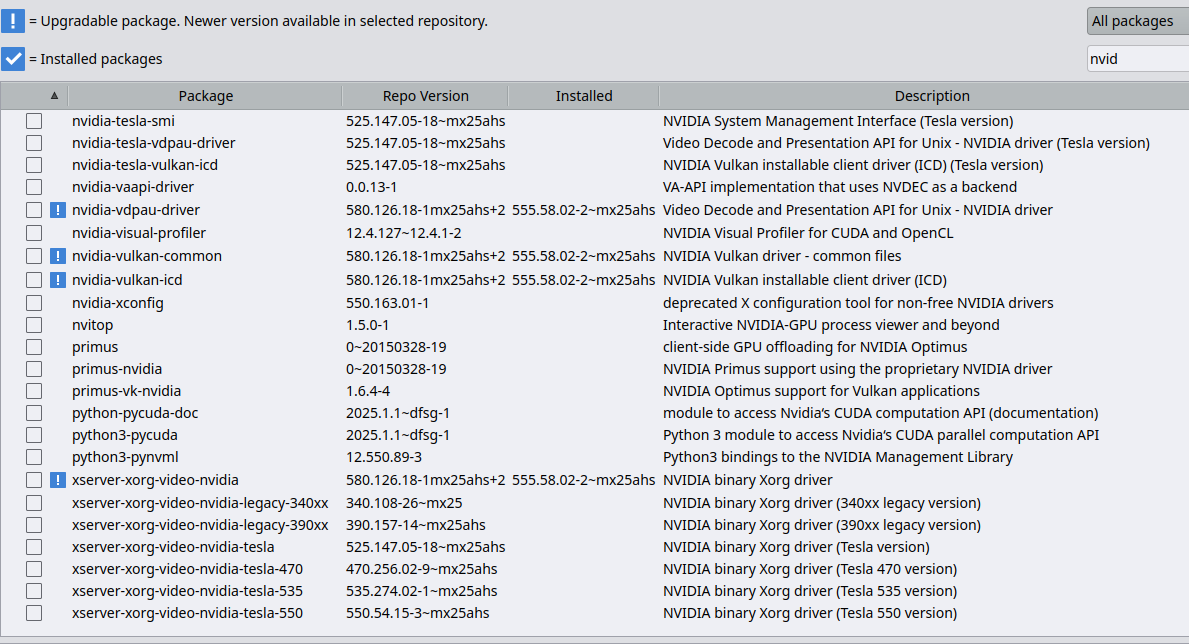
As you can see, the current TS snapshot I rolled back to and that is booting to login is ver 555. But it is the update to 580 that is still causing issues on MX. Not sure why it got resolved in LM.
I backed up everything yesterday intent on just doing a complete new install, but that will mean some setup I would rather not have to do if I can help it.
So is there anyway to not do the updates to nvidia and all related files but update everything else?
Here is my inxi:
System:
  Kernel: 6.18.16-2-liquorix-amd64 [6.18-19mx25ahs] arch: x86_64 bits: 64 compiler: gcc v: 14.2.0 clocksource: tsc
    avail: acpi_pm parameters: audit=0 intel_pstate=disable amd_pstate=disable split_lock_detect=off
    BOOT_IMAGE=/boot/vmlinuz-6.18.16-2-liquorix-amd64 root=UUID=<filter> ro quiet splash
  Desktop: Xfce v: 4.20.1 tk: Gtk v: 3.24.48 wm: xfwm4 v: 4.20.0 with: xfce4-panel
    tools: xfce4-screensaver vt: 7 dm: LightDM v: 1.32.0 Distro: MX-25.1_Xfce_ahs_x64 Infinity
    January 18 2026 base: Debian GNU/Linux 13 (trixie)
Machine:
  Type: Laptop System: Acer product: Predator PT314-51s v: V1.08 serial: <superuser required>
  Mobo: TGL model: Clubman_TLM v: V1.08 serial: <superuser required> part-nu: 0000000000000000
    uuid: <superuser required> UEFI: Insyde v: 1.08 date: 07/23/2021
Battery:
  ID-1: BAT1 charge: 39.4 Wh (100.0%) condition: 39.4/60.2 Wh (65.3%) volts: 16.5 min: 15.5
    model: SMP AP20A7N type: Li-ion serial: <filter> status: full cycles: 128
CPU:
  Info: model: 11th Gen Intel Core i7-11375H bits: 64 type: MT MCP arch: Tiger Lake gen: core 11
    level: v4 note: check built: 2020 process: Intel 10nm family: 6 model-id: 0x8C (140) stepping: 1
    microcode: 0xBC
  Topology: cpus: 1x dies: 1 clusters: 4 cores: 4 threads: 8 tpc: 2 smt: enabled cache:
    L1: 320 KiB desc: d-4x48 KiB; i-4x32 KiB L2: 5 MiB desc: 4x1.2 MiB L3: 12 MiB desc: 1x12 MiB
  Speed (MHz): avg: 516 min/max: 400/3301 boost: enabled scaling: driver: acpi-cpufreq
    governor: performance cores: 1: 516 2: 516 3: 516 4: 516 5: 516 6: 516 7: 516 8: 516
    bogomips: 52838
  Flags: avx avx2 ht lm nx pae sse sse2 sse3 sse4_1 sse4_2 ssse3 vmx
  Vulnerabilities:
  Type: gather_data_sampling mitigation: Microcode
  Type: ghostwrite status: Not affected
  Type: indirect_target_selection mitigation: Aligned branch/return thunks
  Type: itlb_multihit status: Not affected
  Type: l1tf status: Not affected
  Type: mds status: Not affected
  Type: meltdown status: Not affected
  Type: mmio_stale_data status: Not affected
  Type: old_microcode status: Not affected
  Type: reg_file_data_sampling status: Not affected
  Type: retbleed status: Not affected
  Type: spec_rstack_overflow status: Not affected
  Type: spec_store_bypass mitigation: Speculative Store Bypass disabled via prctl
  Type: spectre_v1 mitigation: usercopy/swapgs barriers and __user pointer sanitization
  Type: spectre_v2 mitigation: Enhanced / Automatic IBRS; IBPB: conditional; PBRSB-eIBRS: SW
    sequence; BHI: SW loop, KVM: SW loop
  Type: srbds status: Not affected
  Type: tsa status: Not affected
  Type: tsx_async_abort status: Not affected
  Type: vmscape status: Not affected
Graphics:
  Device-1: Intel TigerLake-LP GT2 [Iris Xe Graphics] vendor: Acer Incorporated ALI driver: i915
    v: kernel alternate: xe arch: Xe process: Intel 10nm built: 2020-21 ports: active: eDP-1
    empty: DP-1 bus-ID: 0000:00:02.0 chip-ID: 8086:9a49 class-ID: 0300
  Device-2: NVIDIA GA106M [GeForce RTX 3050 Ti Mobile / Max-Q] vendor: Acer Incorporated ALI
    driver: nvidia v: 555.58.02 non-free: 550-570.xx+ status: current (as of 2025-04; EOL~2026-12-xx)
    arch: Ampere code: GAxxx process: TSMC n7 (7nm) built: 2020-2023 bus-ID: 0000:01:00.0
    chip-ID: 10de:2523 class-ID: 0300
  Device-3: Chicony HD User Facing driver: uvcvideo type: USB rev: 2.0 speed: 480 Mb/s lanes: 1
    mode: 2.0 bus-ID: 3-8:5 chip-ID: 04f2:b6dd class-ID: 0e02 serial: <filter>
  Display: x11 server: X.Org v: 21.1.16 compositor: xfwm4 v: 4.20.0 driver: X:
    loaded: modesetting,nvidia unloaded: fbdev,nouveau,vesa alternate: nv dri: iris gpu: i915
    display-ID: :0.0 screens: 1
  Screen-1: 0 s-res: 1920x1080 s-dpi: 96 s-size: 509x286mm (20.04x11.26") s-diag: 584mm (22.99")
  Monitor-1: HDMI-1-0 pos: primary res: mode: 1920x1080 hz: 60 scale: 100% (1) dpi: 61
    size: 800x330mm (31.5x12.99") diag: 865mm (34.07") modes: N/A
  Monitor-2: eDP-1 res: mode: 1920x1080 hz: 144 scale: 100% (1) dpi: 158
    size: 309x174mm (12.17x6.85") diag: 355mm (13.96") modes: N/A
  API: EGL v: 1.5 hw: drv: intel iris drv: nvidia platforms: device: 0 drv: nvidia device: 2
    drv: iris device: 3 drv: swrast gbm: drv: kms_swrast surfaceless: drv: nvidia x11: drv: iris
    inactive: wayland,device-1
  API: OpenGL v: 4.6.0 compat-v: 4.5 vendor: intel mesa v: 26.0.1-2~mx25ahs glx-v: 1.4
    direct-render: yes renderer: Mesa Intel Iris Xe Graphics (TGL GT2) device-ID: 8086:9a49
    memory: 22.72 GiB unified: yes
  API: Vulkan v: 1.4.309 layers: 10 device: 0 type: integrated-gpu name: Intel Iris Xe Graphics
    (TGL GT2) driver: mesa intel v: 26.0.1-2~mx25ahs device-ID: 8086:9a49 surfaces: xcb,xlib
    device: 1 type: discrete-gpu name: NVIDIA GeForce RTX 3050 Ti Laptop GPU driver: nvidia
    v: 555.58.02 device-ID: 10de:2523 surfaces: xcb,xlib device: 2 type: cpu name: llvmpipe (LLVM
    19.1.7 256 bits) driver: mesa llvmpipe v: 26.0.1-2~mx25ahs (LLVM 19.1.7) device-ID: 10005:0000
    surfaces: xcb,xlib
  Info: Tools: api: eglinfo, glxinfo, vulkaninfo de: xfce4-display-settings
    gpu: nvidia-settings,nvidia-smi x11: xdriinfo, xdpyinfo, xprop, xrandr
Audio:
  Device-1: Intel Tiger Lake-LP Smart Sound Audio vendor: Acer Incorporated ALI
    driver: sof-audio-pci-intel-tgl alternate: snd_soc_avs, snd_sof_pci_intel_tgl, snd_hda_intel
    bus-ID: 0000:00:1f.3 chip-ID: 8086:a0c8 class-ID: 0401
  Device-2: NVIDIA GA106 High Definition Audio vendor: Acer Incorporated ALI
    driver: snd_hda_intel v: kernel bus-ID: 0000:01:00.1 chip-ID: 10de:228e class-ID: 0403
  API: ALSA v: k6.18.16-2-liquorix-amd64 status: kernel-api tools: alsactl,alsamixer,amixer
  Server-1: PipeWire v: 1.4.5 status: active with: 1: pipewire-pulse status: active
    2: wireplumber status: active 3: pipewire-alsa type: plugin 4: pw-jack type: plugin
    tools: pactl,pw-cat,pw-cli,wpctl
Network:
  Device-1: Intel Wi-Fi 6 AX201 vendor: Rivet Networks driver: iwlwifi v: kernel modules: wl
    bus-ID: 0000:00:14.3 chip-ID: 8086:a0f0 class-ID: 0280
  IF: wlan0 state: up mac: <filter>
  Info: services: NetworkManager, smbd, wpa_supplicant
Bluetooth:
  Device-1: Intel AX201 Bluetooth driver: btusb v: 0.8 type: USB rev: 2.0 speed: 12 Mb/s lanes: 1
    mode: 1.1 bus-ID: 3-10:7 chip-ID: 8087:0026 class-ID: e001
  Report: hciconfig ID: hci0 rfk-id: 3 state: up address: <filter> bt-v: 5.2 lmp-v: 11
    sub-v: 21c1 hci-v: 11 rev: 21c1 class-ID: 6c010c
  Info: acl-mtu: 1021:4 sco-mtu: 96:6 link-policy: rswitch sniff link-mode: peripheral accept
    service-classes: rendering, capturing, audio, telephony
RAID:
  Hardware-1: Intel Volume Management Device NVMe RAID Controller driver: vmd v: 0.6 port: N/A
    bus-ID: 0000:00:0e.0 chip-ID: 8086:9a0b rev: class-ID: 0104
Drives:
  Local Storage: total: 5.46 TiB used: 5.24 TiB (95.9%)
  SMART Message: Unable to run smartctl. Root privileges required.
  ID-1: /dev/nvme0n1 maj-min: 259:0 vendor: Samsung model: SSD 970 EVO Plus 1TB size: 931.51 GiB
    block-size: physical: 512 B logical: 512 B speed: 31.6 Gb/s lanes: 4 tech: SSD serial: <filter>
    fw-rev: 2B2QEXM7 temp: 50.9 C scheme: GPT
  ID-2: /dev/sdb maj-min: 8:16 vendor: Western Digital model: WD50NDZW-11MR8S1 size: 4.55 TiB
    block-size: physical: 4096 B logical: 512 B type: USB rev: 3.2 spd: 5 Gb/s lanes: 1
    mode: 3.2 gen-1x1 tech: HDD rpm: 5400 serial: <filter> fw-rev: 1023 scheme: GPT
Partition:
  ID-1: / raw-size: 650.17 GiB size: 638.9 GiB (98.27%) used: 207.2 GiB (32.4%) fs: ext4
    dev: /dev/nvme0n1p2 maj-min: 259:2
  ID-2: /boot/efi raw-size: 511 MiB size: 252 MiB (49.32%) used: 9.1 MiB (3.6%) fs: vfat
    dev: /dev/nvme0n1p1 maj-min: 259:1
Swap:
  Kernel: swappiness: 15 (default 60) cache-pressure: 100 (default) zswap: no
  ID-1: swap-1 type: file size: 5 GiB used: 0 KiB (0.0%) priority: -2 file: /swap/swap
Sensors:
  System Temperatures: cpu: 71.0 C mobo: N/A
  Fan Speeds (rpm): N/A
Repos:
  Packages: 2462 pm: dpkg pkgs: 2430 libs: 1268 tools: apt, apt-get, aptitude, nala, synaptic
    pm: rpm pkgs: 0 pm: flatpak pkgs: 32
  No active apt repos in: /etc/apt/sources.list
  Active apt repos in: /etc/apt/sources.list.d/debian.sources
    1: deb http://deb.debian.org/debian/ trixie main  contrib non-free non-free-firmware
    2: deb http://security.debian.org/debian-security/ trixie-security main  contrib non-free non-free-firmware
    3: deb http://deb.debian.org/debian/ trixie-updates  main contrib non-free non-free-firmware
  Active apt repos in: /etc/apt/sources.list.d/mx.sources
    1: deb http://mxrepo.com/mx/repo/ trixie main  non-free
    2: deb http://mxrepo.com/mx/repo/ trixie ahs
Info:
  Memory: total: N/A available: 23.27 GiB used: 9.47 GiB (40.7%)
  Processes: 410 Power: uptime: 10h 9m states: freeze,mem,disk suspend: s2idle avail: deep
    wakeups: 0 hibernate: platform avail: shutdown, reboot, suspend, test_resume image: 9.22 GiB
    services: upowerd,xfce4-power-manager Init: SysVinit v: 3.14 runlevel: 5 default: graphical
    tool: systemctl
  Compilers: gcc: 14.2.0 Client: shell wrapper v: 5.2.37-release inxi: 3.3.38
Dual Init Detected
Boot Mode: UEFI
```
Thanks,
Sheila Flanagan
