Today I dared to upgrade my desktop from LMDE6 to LMDE7. In general, it was running smoothly. After all four cores were roaring for approximately 45 minutes, the job was done. But finally, some of my tools were uninstalled. I had to reinstallsynaptic, locate and conky. There might be more; we’ll see later. No clue why they removed them.
Edit
OK, there is one more left. The external SSD, connected via USB, is no longer mounted by LMDE7. A new fstab entry is required.
I always find issues with upgrade so prefer clean new install. Ok it takes longer but cleans the system out as part of the install.
Did one early this week but not had chance to test or use busy on another project.
I did also try a xfce update from 22.1 to 22.2 but that got stuck in a reboot loop so again just installed clean the original and will leave it alone till I have more time to adress the 2 issues
I understand, and I did fresh installs as well when there was no mintupgrade tool available.
The problem is, all the stuff I’d have to install to get my desktop back to its working environment, would take much longer. Time that I don’t have or don’t want to afford.
IIRC there was a tool that created a snapshot of everything you installed additionally. Then you could reinstall the whole bunch with a few clicks. I don’t know whether this tool still exists nor its name.
Thats what I use, but not convinced it does everything correctly.
Good idea, but in my case as I dont have work just files its not important for me.
Cannot help point you at a tool, backup and restore is great for files but installed apps no help. Think its the other files associated cause the issues.
I see and understand. For just email and office, it might be sufficient. But I need to install many tools to reach my required working environment. And this takes time.
There must be some setting that has changed. Udisks2 is involved in detecting hotplugs, not sure what decides whether to mount them. It may be udev rules. Mine dont mount.
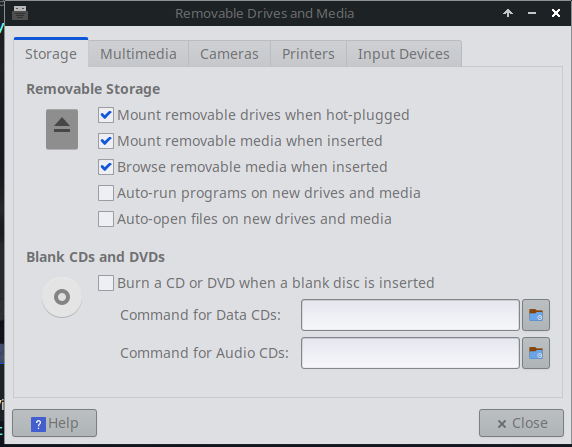
I have seen a setting somewhere in the DE about the behaviour of hotplugged devices…cd’s, memory cards, and disks… it includes whether they automount.
I am trying to think, but I am not on the PC and cant check. Have a search in Settings → …
I thought any usb device was a hotplug… even one you leave connected all the time.?
Edit: I found it:
Settings → Removable Drives and Media
I got it; it’s obviously by design. A security thing; they™ don’t want to auto-mount any device formatted with an ext* filesystem.
abu@abu-tc ~ $ cat /usr/lib/udev/rules.d/64-ext4.rules
# SPDX-License-Identifier: GPL-2.0-or-later
#
# Copyright (C) 2023 Oracle.  All rights reserved.
# Author: Darrick J. Wong <djwong@kernel.org>
#
# Don't let udisks automount ext4 filesystems without even asking a user.
# This doesn't eliminate filesystems as an attack surface; it only prevents
# evil maid attacks when all sessions are locked.
#
# According to http://storaged.org/doc/udisks2-api/latest/udisks.8.html,
# supplying UDISKS_AUTO=0 here changes the HintAuto property of the block
# device abstraction to mean "do not automatically start" (e.g. mount).
SUBSYSTEM=="block", ENV{ID_FS_TYPE}=="ext2|ext3|ext4|ext4dev|jbd", ENV{UDISKS_AUTO}="0"
Check if the VM is using MBR or UEFI.
Modern linuxes like lmde7 might require UEFI… most virtualisation software ( eg Vbox or virt-manager) defaults to MBR.
Thanks: Yeah, the VM (VMware WS) is BIOS, not UEFI. The “real” installation is all UEFI with secure boot. I am not much of an “upgrade” person, new install is an opportunity to get rid of cruft. It would have been nice to get a warning about conflicts.
I run “dual boot”, main is Debian (now 13) and the LMDE is secondary, although I use both. I always test new stuff in a VM. I have 2 nvme drives dedicated to VM’s.
Put your personal data on a separate partition. Then both OS’s can mount that partition and use the same files. They cant share a /home directory… the dot files will clash.
I have had trouble… but not with LMDE. do you get a choice during install?
A VM will look after providing an MBR space, if you use MBR… but if you use UEFI you have to provide an EFI partition when you setup the virtual disk, it is not automatic.