While searching for existing articles & threads on this topic, this closest I found was this one, which is quite outdated (I don’t think Proton even had calendar integration when originally posted). So, what are your favorite libre calendar apps/webapps, and why are they your favorite?
I’ve been using Proton Calendar for a few years, and it’s quite decent. That said, it does have some limitations unless you’re willing to upgrade for $10+ (USD) monthly, which I find quite steep if I’m only after a better calendar/scheduler. I’m especially interested in ones that have web apps and/or are available on both Linux and Android; however, I want this to be a general thread for the topic, and not just recommendations geared towards me. Hopefully this will become a useful thread for many users to come.
I am sad, I still use paper pen and a real diary calendar…..
Mainly as when I am out and about no internet and when planning holidays I like to write it down and then at a glance I can do a countdown to going away
Aslo my wife uses it for joint events.
Tried electronic and could not get to like them, when working my secretary filled in my electronic diary, arranged meetings put reminder in, I never felt I was the boss just that she was controlling my time
I use Google calendar (yesyes, the machine blahblah). Mainly because it comes with Android. I actually quite like it. It has never disappointed me. When Google starts yelling at me that I need to pay up, or don’t get to use a feature I use anymore, I’ll switch to Proton.
I must confess, I only ever use the cal command or whatever I can click on in Xfce.
Integration with Android is on my wish list … but I keep being scared off by stories from people who spend their life syncing and never do anything.
For reminders and Calendar stuff - I use Google (mostly in a browser - i.e. Brave)… it’s easiest - integrates 100% with Android…
I discovered something recently - even though I share my Google Calendar with my Apple Calendar (on MacOS) - MacOS calendar doesn’t share my Google entries with my apple shared family Calendar…
Case back in late September - I’d put my blood donation appointment in my google calendar - but then my missus went and booked a dentist appointment at the same time - I’d assumed she could see the appointments I’d shared to apple calendar from google - but no… The conflict was over access to the family car - I prefer to drive to the blood bank (vs my Harley, or one of my PEVs [personal electric vehicle - e-scooter or e-bike]).
I have to click in Apple Calendar and change the person to “Me” and save it - and then it gets removed from my Google calendar! Doh! i.e. also gets removed from the calendar app on my android! Doh!
So - now I have to remember to double entry every new appointment!
I did some google-fu to see how I could avoid double-entry - but gave up…
Anyway - if I just wanna look at a calendar - I use the ancient tried and true UNIX CLI “cal” which comes in the package “ncal” which Ubuntu decided was so vast in space (uses a whopping 37 kb) - they don’t install it by default anymore :
╭─x@titanii ~
╰─➤  cal
   November 2025
Su Mo Tu We Th Fr Sa
                   1
 2  3  4  5  6  7  8
 9 10 11 12 13 14 15
16 17 18 19 20 21 22
23 24 25 26 27 28 29
30
╭─x@titanii ~
╰─➤  which cal
/usr/bin/cal
╭─x@titanii ~
╰─➤  file /usr/bin/cal
/usr/bin/cal: symbolic link to ncal
╭─x@titanii ~
╰─➤  which ncal
/usr/bin/ncal
╭─x@titanii ~
╰─➤  file /usr/bin/ncal
/usr/bin/ncal: ELF 64-bit LSB pie executable, x86-64, version 1 (SYSV), dynamically linked, interpreter /lib64/ld-linux-x86-64.so.2, BuildID[sha1]=73189d7ef80249d6b9590bf3a76e4aefdf8b99a8, for GNU/Linux 3.2.0, stripped
╭─x@titanii ~
╰─➤  ls -alh /usr/bin/ncal
-rwxr-xr-x 1 root root 37K Feb 20  2023 /usr/bin/ncal
Reminds me of the old days on Solaris - where some idiot trying to reduce storage used - would delete the man pages! WTF? What? Wow! You saved a massive 8 KB on a 1 GB “/” partition - well done MORON!
We had one group that decided we did not need the Fortran compiler. Several research projects ground to a halt.
I spent my whole research life argueing that scientists should manage their own computers. I did not always win, but I kept control of my own equipment.
How many business computers are self managed today? I think very few.
I tend to self-host as much as possible.
So my favorite backend is Radicale, as for why: it is more lightweight than Baikal or any other php-written stuff, and that was very important around 2010 (can’t really remember the correct year) when I started to use my own home server, and it had to run on a low-end cheap intel Atom powered motherboard.
So my calendar and addressbook is backed by Radicale since ages. I’m happy with that.
As for managing the content: I use Davx5 (available on both FDroid and Play store) on Android, which can synchronize the phones entries. The builtin calendar apps can use the Davx snychronized entries, but I like Ethar (available on FDroid) better, somehow I have a better sight on it regarding free times and busy times.
On desktop and laptop computers I use Evolution, but others in my family use Thunderbird.
Recently Thunderbird can work with Radicale on its own, but before there was necessary to have an extension, namely TBSync.
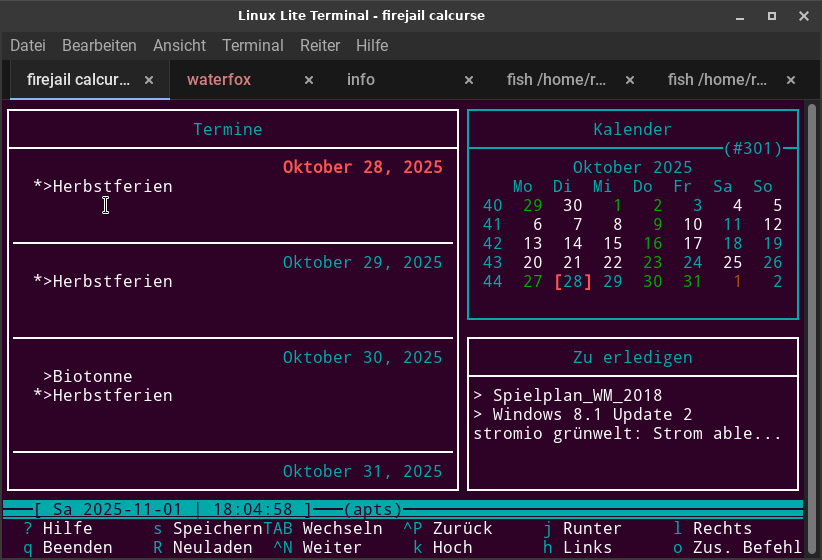
Those just present a calendar in a terminal way, don’t they? But that calendar is empty, just the days are shown. No information about appointments, meeetings etc. Am I wrong?
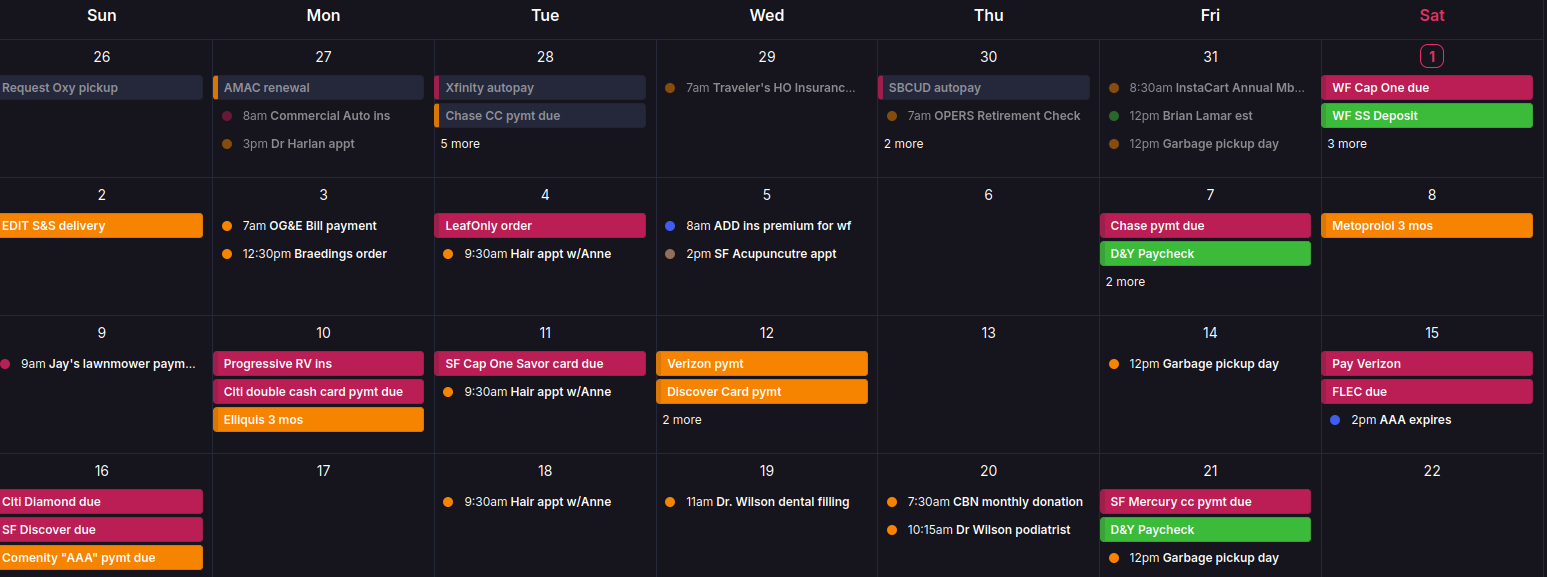
My calendar is used for everything since I can’t keep up with all of the monthly items on my list without reminders or at least a place to look at a week’s bills to pay and remember to pay them (I don’t do autopay), appts for my husband, my mom and myself.
As referenced above, I did used to host with Etesync (CalDav) and used Calengoo on Linux Mint computer and Etar on Android phone. But I stopped paying for Etesync this year, intending to switch to Radicale. Just have not found the time to get that done,
Since Proton Calendar has come so far, I use that extension in Thunderbird for my computer calendars and that is where I mostly update them. I have several so that each type of entry has a different color and I can see at a glance doctor appts from bill payments due, etc. I even shared my Mom’s Proton Calendar with me so that when I am on my desktop calendar I can see her items boldly in my calendar, if I need to. I can also uncheck each calendar so that it does not display.
I also use Proton Calendar on Android. Not for looking at much as it is too small for my eyes to read. But in a pinch, I can add entries from there.
The only thing Proton Calendar lacks on Linux is desktop notifications, but it does notify on Android so that is sufficient for now. Since I connect my phone to my laptop via KDE Connect, any notifications from there appear briefly on my screen. The downside is that if I am away from the computer, they disappear after a few seconds and I miss them.
I have on my To Do list to attempt to use cron and reminder commands to compensate for the lack of desktop notifications from Proton as that may be my resolution, but still needing to research specifics for my use case.
I don’t have any experience using the desktop app, but the webapp does allow for desktop notifications. Those have worked for me in Mint & CachyOS using FF. Another, more roundabout, option is to set up email notifications for your calendar events (assuming the desktop app for Proton Mail has desktop notifications).
Sheila, the Proton Calendar app on my phone reminds me of upcoming calendar entries. Since I’m trying mightily to deGoogle my life, Proton services are doing a great job for me.
Hi Rosika,
Congratulations. I think that is the ultimate solution.
So simple , I think even I might be tempted to try it.
The only thing missing is Android usage… I wonder if it will work in termux?
Regards
Neville
I do get the notifications on my phone and since I use KDE Connect to have my phone notifications show up on my MX Linux (and all other distros) they do appear there for a few seconds. But I cannot use that small phone screen to make entries, update the notes, etc. So I use my computer for that. I just wish we had the same notifications on Linux desktop that we have on Android where it does not go away until we swipe it away. So i just have to look at my calendar and see that I have a bill to pay today, and do it then, or I will forget
Creating an event, it has by default “notification” 15 min before, which does not work in Thunderbird or Linux electron app. It also has by default “email notification” but that is useless as it does not say what the event is, just notifies you via email that you have an event.
But their latest roadmap says the next big thing is the Linux desktop app, not just electron. YAY!
Yes, the browser version does. But I have 8 email accounts under 2 main accounts and need to keep those separate, thus I use Thunderbird.
In a pinch, I have used the web version, but having to scroll through numerous non-essential business emails to find the one I need is too time-consuming. Besides, I have enough pinned tabs (10) and about 5-6 open in my browser most of the time.
I do pin the drive folder in the browser so I can easily upload files to it and I have the new setting on Android where my pics are automatically backed up to my Proton drive.
Hopefully we get the full Linux desktop app soon, like they have already provided for Windows & Mac.
There is. I just recently had to go into Notifications and try to resolve an annoying issue with KDE Connect app–the app that makes my Android notifications appear on screen in MX.
I came back to my laptop and found the entire screen covered with notifications because I had them persist. Unlike “swipe” on phone, I have to click each one to make them disappear.
I tried even deleting the KDE app under notifications (you can have notifications from some and not others) but it would not stop the phone notifications. Part of the issue, I think, lies in your phone being connected via bluetooth and mine must be unstable connection sometimes as the majority of those that covered my entire screen were “Pixel disconnected” “Pixel connected” and that can happen continuously over and over each time one machine or the other (not sure which) sees the connect/disconnect. It drove me nuts.
The only resolution that worked mostly was to not let the notifications stay on screen; disappear after 5 seconds. Maybe it is because I am using it in a non-KDE environment? I don’t recall having that issue in the past on Linux Mint or Kubuntu, but then I had an older phone then.
Either way, if I am at the computer when the notification from my phone appears, I see it. Otherwise, it is up to me to check all notifications on my phone, in order not to miss something important from the calendar. Sigh.
That is why I researched using cron jobs and reminder in terminal to set the reminders there so they are only on the computer and forget the phone ones. But I have not figured out how to do repeating events and I have a lot of those that I would hate to have to enter for every single day, week, month, etc. for each occurrence.