So, I created a virtual machine with a clean install of Debian 13 - it was a netinstall, with only the basic tools selected, no desktop, nothing fancy at all… I basically redid my working setup, with some differences though, because I wanted to stick to the defaults as much as possible.
This VM has now an IP of 192.168.1.108 in my LAN.
Of course this could be bare metal machine as well.
So the empty the server is up and running, it accepts SSH connections, and for simplicity I use the root account to thinker. Let’s get to it!
apt install radicale nginx apache2-utils tree
That installs Radicale itself, NGINX as the reverse proxy (making the thing more robust and flexible), apache2-utils which contians htpasswd for managin users and passwords for Radicale, the tree command just show directory structures, this one is not really needed for the working of the Caldav/Cardav server.
Change some of the defaults in the Radicale config, so edit /etc/radicale/config file, maybe using nano.
By default all the entries are commented out, so scroll down, and uncomment those I show here as uncommented, and chage the value to something I show here:
[server]

hosts = localhost:5232

[auth]

# Authentication method

# Value: none | htpasswd | remote_user | http_x_remote_user | dovecot | ldap | oauth2 | pam |>

type = htpasswd

# Htpasswd filename

htpasswd_filename = /etc/radicale/users

htpasswd_encryption = sha256

[rights]

# Rights backend

# Value: authenticated | owner_only | owner_write | from_file

type = owner_only

[storage]

# Storage backend

# Value: multifilesystem | multifilesystem_nolock

#type = multifilesystem

# Folder for storing local collections, created if not present

filesystem_folder = /var/lib/radicale/collections

[web]

# Web interface backend

# Value: none | internal

type = internal
That’s it. Using this config after restart Radicale listens only on localhost which is great as I want to use it behind NGINX. Why NGINX?
Because it makes it simpler to to configure clients, Radicale will not be bound to special port so it will be accessible from hotels for example, where firewall blocks outbound connections other than standard web ports. NGINX allows to put Radicale on a non-root URL, such as http://server/radicale instead of a root URL with a special port, such as http://server:5232.
So deploying it behind NGINX is a good idea I think.
But Radicale is not yet functional, as we need one user at least.
Create a user (and password also):
root@debian:~# htpasswd -c -2 /etc/radicale/users myuser
New password:
Re-type new password:
Adding password for user myuser
root@debian:~#
Later you can add other users using the same commandline, just omit the -c flag, so htpasswd won’t erase the existing users file:
htpasswd -2 /etc/radicale/users anotheruser
The default install leaves Radicale storage space owned by root, so it won’t be able to write into it. To make this right:
chown radicale:radicale /var/lib/radicale/ -R
At this point Radicale is ready to start, fire it up:
systemctl start radicale
Check wether it really runs:
root@debian:~# systemctl status radicale
● radicale.service - A simple CalDAV (calendar) and CardDAV (contact) server
     Loaded: loaded (/usr/lib/systemd/system/radicale.service; disabled; preset: ena>
     Active: active (running) since Thu 2025-11-20 07:16:37 PST; 1min 29s ago
 Invocation: 5c90023eb19244a7bb1e6f9744ca3e01
       Docs: man:radicale(1)
   Main PID: 1903 (radicale)
      Tasks: 1 (limit: 6198)
     Memory: 19.5M (peak: 21.3M)
        CPU: 223ms
     CGroup: /system.slice/radicale.service
             └─1903 /usr/bin/python3 /usr/bin/radicale

Nov 20 07:16:37 debian radicale[1903]: [1903] [INFO] Storage folder umask (from syst>
Nov 20 07:16:37 debian radicale[1903]: [1903] [INFO] rights type is 'radicale.rights>
Nov 20 07:16:37 debian radicale[1903]: [1903] [INFO] web type is 'radicale.web.inter>
Nov 20 07:16:37 debian radicale[1903]: [1903] [INFO] hook type is 'radicale.hook.non>
Nov 20 07:16:37 debian radicale[1903]: [1903] [INFO] Default script name to strip fr>
Nov 20 07:16:37 debian radicale[1903]: [1903] [INFO] permit delete of collection: Tr>
Nov 20 07:16:37 debian radicale[1903]: [1903] [INFO] permit overwrite of collection:>
Nov 20 07:16:37 debian radicale[1903]: [1903] [INFO] Listening on '[::1]:5232'
Nov 20 07:16:37 debian radicale[1903]: [1903] [INFO] Listening on '127.0.0.1:5232'
Nov 20 07:16:37 debian radicale[1903]: [1903] [INFO] Radicale server ready
root@debian:~#
Wow! It really runs! 
However, the service is still disabled disabled, so it won’t start on next boot automatically.
Enable it:
systemctl enable radicale
Recheck:
root@debian:~# systemctl status radicale
● radicale.service - A simple CalDAV (calendar) and CardDAV (contact) server
     Loaded: loaded (/usr/lib/systemd/system/radicale.service; enabled; preset: enabled)
     Active: active (running) since Thu 2025-11-20 07:16:37 PST; 3min 34s ago
 Invocation: 5c90023eb19244a7bb1e6f9744ca3e01
       Docs: man:radicale(1)
   Main PID: 1903 (radicale)
      Tasks: 1 (limit: 6198)
     Memory: 19.5M (peak: 21.3M)
        CPU: 223ms
     CGroup: /system.slice/radicale.service
             └─1903 /usr/bin/python3 /usr/bin/radicale

Nov 20 07:16:37 debian radicale[1903]: [1903] [INFO] Storage folder umask (from system): '0027'
Nov 20 07:16:37 debian radicale[1903]: [1903] [INFO] rights type is 'radicale.rights.owner_only'
Nov 20 07:16:37 debian radicale[1903]: [1903] [INFO] web type is 'radicale.web.internal'
Nov 20 07:16:37 debian radicale[1903]: [1903] [INFO] hook type is 'radicale.hook.none'
Nov 20 07:16:37 debian radicale[1903]: [1903] [INFO] Default script name to strip from URI if called by reverse proxy is taken from HTTP_X_SCRIPT_NAME or SCRIPT_NAME
Nov 20 07:16:37 debian radicale[1903]: [1903] [INFO] permit delete of collection: True
Nov 20 07:16:37 debian radicale[1903]: [1903] [INFO] permit overwrite of collection: True
Nov 20 07:16:37 debian radicale[1903]: [1903] [INFO] Listening on '[::1]:5232'
Nov 20 07:16:37 debian radicale[1903]: [1903] [INFO] Listening on '127.0.0.1:5232'
Nov 20 07:16:37 debian radicale[1903]: [1903] [INFO] Radicale server ready
root@debian:~#
That looks really fine.
Still there’s no connection to it, as NGINX is not yet set up to do it.
Let’s add this snippet:
location /radicale/ {
          proxy_pass                    http://127.0.0.1:5232/;
          proxy_set_header              X-Script-Name /radicale;
          proxy_set_header              X-Forwarded-For $proxy_add_x_forwarded_for;
          proxy_set_header              X-Remote-User $remote_user;
}
To /etc/nginx/sites-available/default so that it will look like this:
root@debian:~# cat /etc/nginx/sites-available/default
##
# You should look at the following URL's in order to grasp a solid understanding
# of Nginx configuration files in order to fully unleash the power of Nginx.
# https://www.nginx.com/resources/wiki/start/
# https://www.nginx.com/resources/wiki/start/topics/tutorials/config_pitfalls/
# https://wiki.debian.org/Nginx/DirectoryStructure
#
# In most cases, administrators will remove this file from sites-enabled/ and
# leave it as reference inside of sites-available where it will continue to be
# updated by the nginx packaging team.
#
# This file will automatically load configuration files provided by other
# applications, such as Drupal or Wordpress. These applications will be made
# available underneath a path with that package name, such as /drupal8.
#
# Please see /usr/share/doc/nginx-doc/examples/ for more detailed examples.
##

# Default server configuration
#
server {
	listen 80 default_server;
	listen [::]:80 default_server;

	# SSL configuration
	#
	# listen 443 ssl default_server;
	# listen [::]:443 ssl default_server;
	#
	# Note: You should disable gzip for SSL traffic.
	# See: https://bugs.debian.org/773332
	#
	# Read up on ssl_ciphers to ensure a secure configuration.
	# See: https://bugs.debian.org/765782
	#
	# Self signed certs generated by the ssl-cert package
	# Don't use them in a production server!
	#
	# include snippets/snakeoil.conf;

	root /var/www/html;

	# Add index.php to the list if you are using PHP
	index index.html index.htm index.nginx-debian.html;

	server_name _;

	location / {
		# First attempt to serve request as file, then
		# as directory, then fall back to displaying a 404.
		try_files $uri $uri/ =404;
	}

location /radicale/ {
          proxy_pass                    http://127.0.0.1:5232/;
          proxy_set_header              X-Script-Name /radicale;
          proxy_set_header              X-Forwarded-For $proxy_add_x_forwarded_for;
          proxy_set_header              X-Remote-User $remote_user;

}


	# pass PHP scripts to FastCGI server
	#
	#location ~ \.php$ {
	#	include snippets/fastcgi-php.conf;
	#
	#	# With php-fpm (or other unix sockets):
	#	fastcgi_pass unix:/run/php/php7.4-fpm.sock;
	#	# With php-cgi (or other tcp sockets):
	#	fastcgi_pass 127.0.0.1:9000;
	#}

	# deny access to .htaccess files, if Apache's document root
	# concurs with nginx's one
	#
	#location ~ /\.ht {
	#	deny all;
	#}
}


# Virtual Host configuration for example.com
#
# You can move that to a different file under sites-available/ and symlink that
# to sites-enabled/ to enable it.
#
#server {
#	listen 80;
#	listen [::]:80;
#
#	server_name example.com;
#
#	root /var/www/example.com;
#	index index.html;
#
#	location / {
#		try_files $uri $uri/ =404;
#	}
#}
root@debian:~#
Now restart NGINX, and check wether it runs too:
root@debian:~#
systemctl restart nginx
root@debian:~# systemctl status nginx
● nginx.service - A high performance web server and a reverse proxy server
     Loaded: loaded (/usr/lib/systemd/system/nginx.service; enabled; preset: enabled)
     Active: active (running) since Thu 2025-11-20 07:28:26 PST; 6s ago
 Invocation: 42ac14470e354d6fa4f7866d3951bc99
       Docs: man:nginx(8)
    Process: 2025 ExecStartPre=/usr/sbin/nginx -t -q -g daemon on; master_process on; (code=exited, status=0/SUCCESS)
    Process: 2028 ExecStart=/usr/sbin/nginx -g daemon on; master_process on; (code=exited, status=0/SUCCESS)
   Main PID: 2030 (nginx)
      Tasks: 5 (limit: 6198)
     Memory: 4.4M (peak: 4.9M)
        CPU: 85ms
     CGroup: /system.slice/nginx.service
             ├─2030 "nginx: master process /usr/sbin/nginx -g daemon on; master_process on;"
             ├─2031 "nginx: worker process"
             ├─2032 "nginx: worker process"
             ├─2033 "nginx: worker process"
             └─2034 "nginx: worker process"

Nov 20 07:28:26 debian systemd[1]: Starting nginx.service - A high performance web server and a reverse proxy server...
Nov 20 07:28:26 debian systemd[1]: Started nginx.service - A high performance web server and a reverse proxy server.
root@debian:~#
Splendid! 
Now open your browser, and connect to your server instance; enter the URL, which is now only the IP of the server. In my example it is 192.168.1.108, of course your IP will differ. Please note, that there’s no SSL yet!!! So the URL starts with http:// instead of https://
So if everything works as expected, a similar page will be displayed for you:
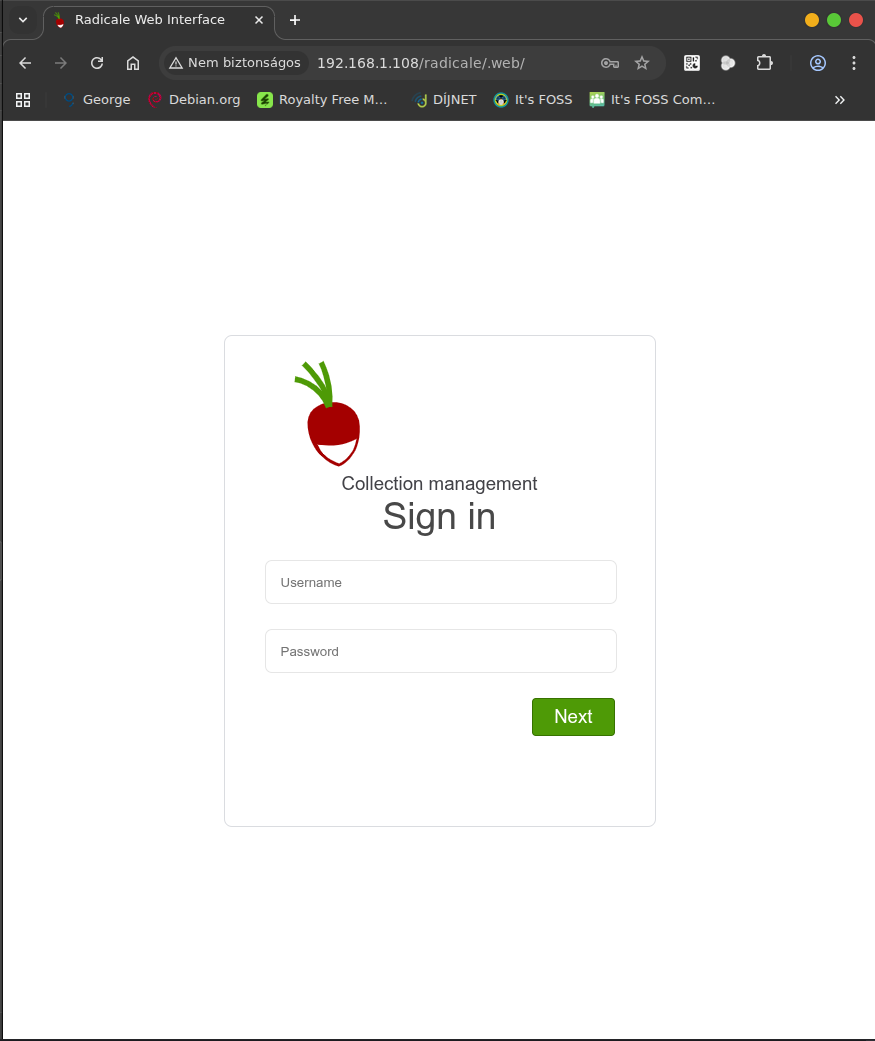
Login with the username/password you created before! Something similar should appear:

You see your collections are empty.
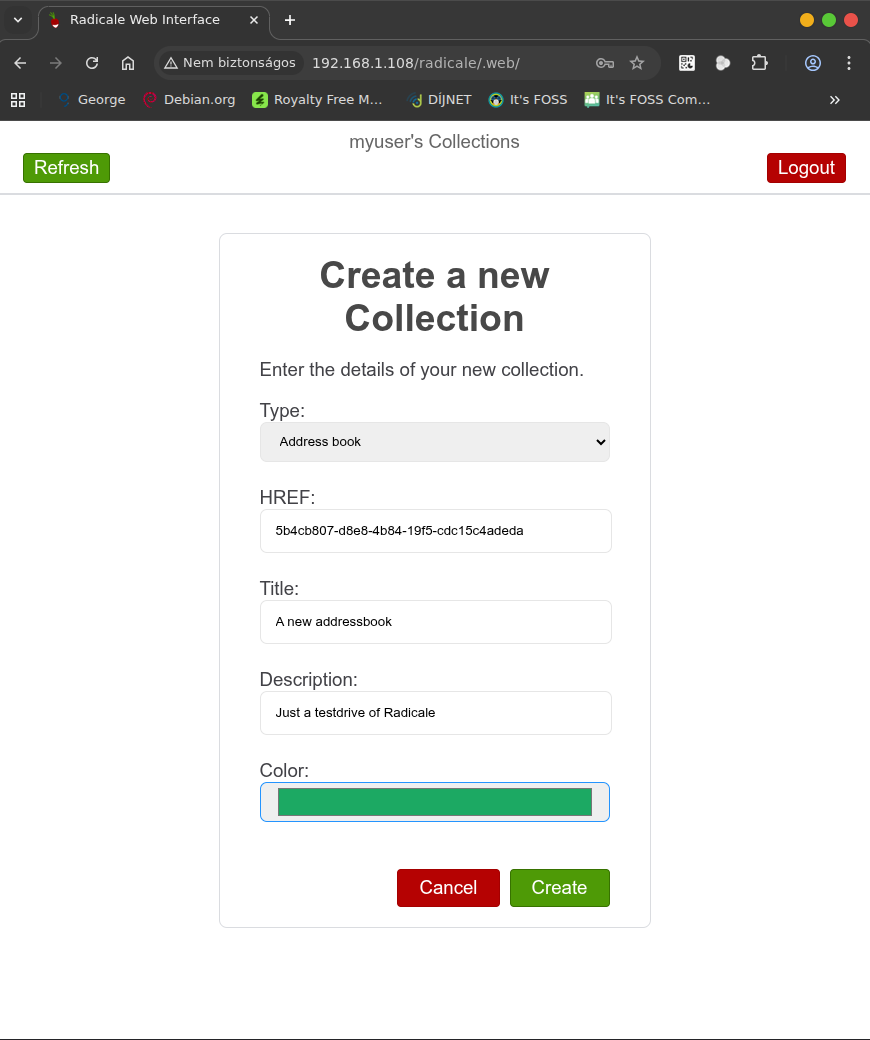
Create something you’ll need!
Click the „+“!
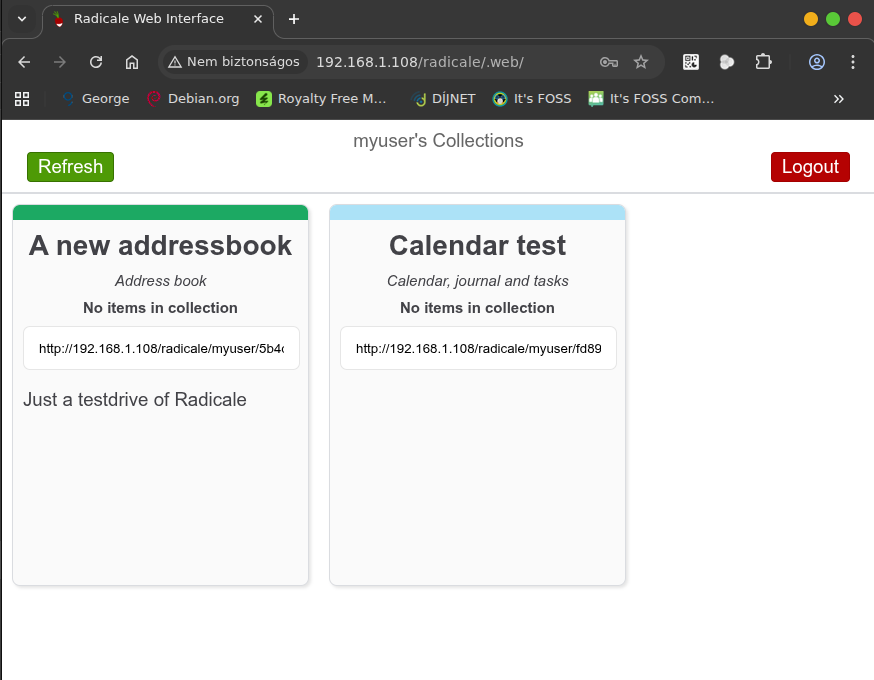
I create an addressbook and a calendar (with tasks, journal support):
So the collection looks like this:
Now I show you in the server console that directories were created:
 root@debian:/var/lib/radicale# tree -L 4
.
└── collections
    └── collection-root
        └── myuser
            ├── 5b4cb807-d8e8-4b84-19f5-cdc15c4adeda
            └── fd890608-5fac-adf1-cfdd-29234b74e294

6 directories, 0 files
So the collections are there, those are emtpy yet.
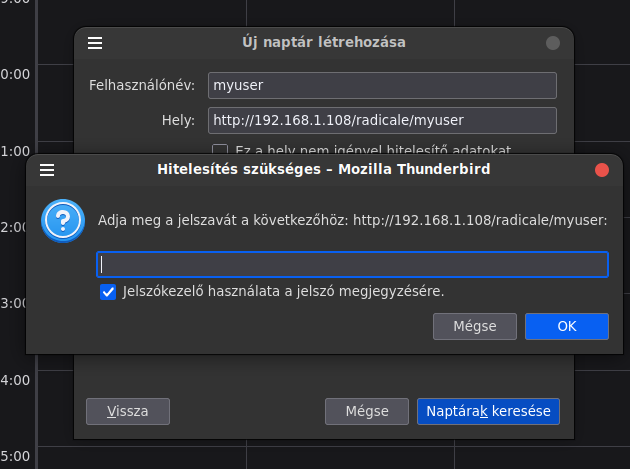
Now I open Thunderbird, and add that calendar, that will be a „network“ calendar:
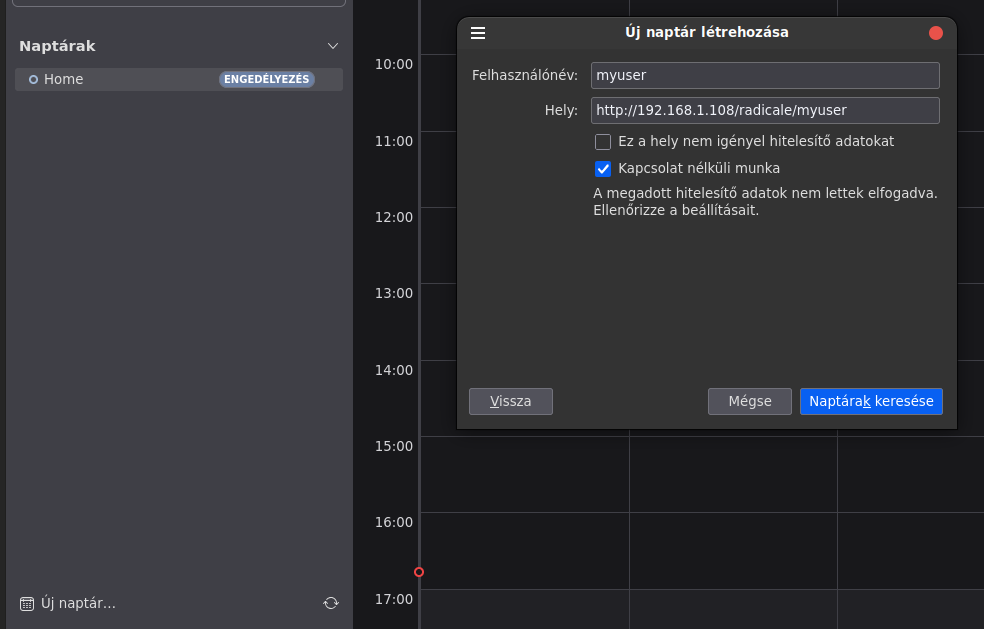
Enter the username on Radicale, and below put the URL of your Radicale (this is radicale_root/your_username) and click „look for calendars.
Enter the required password:
Choose CalDAV, when asked.
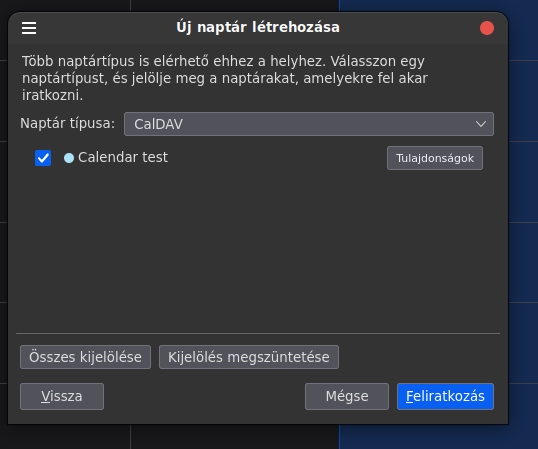
Having your calendar added (you „subscribed“ to it), you may change the default synchronization interval. Open the properties of the calendar.
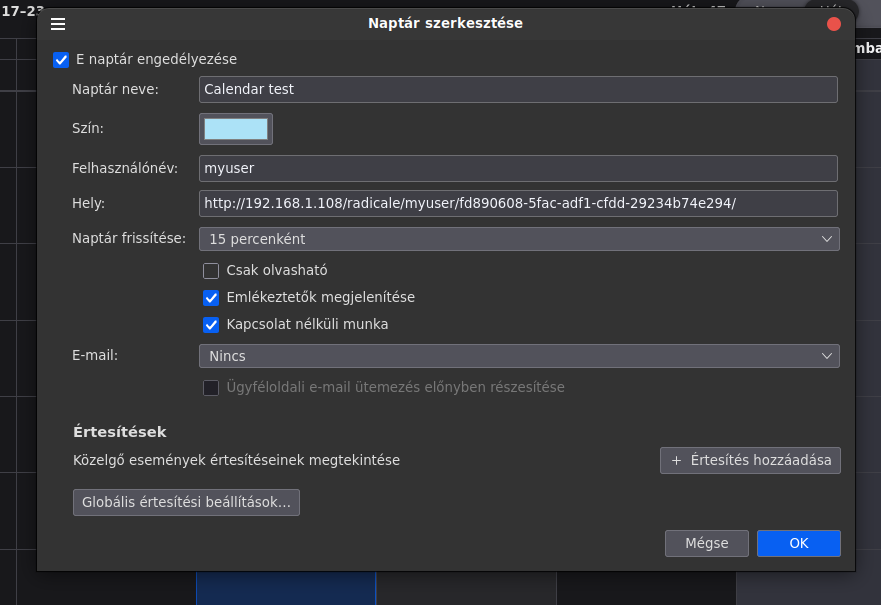
I like it to be something shorter than the default, so when I edit an entry on a device it gets synchronized sooner. 15 minutes for me seems adequate, but make your own choice!
Now I add a test event into the calendar:
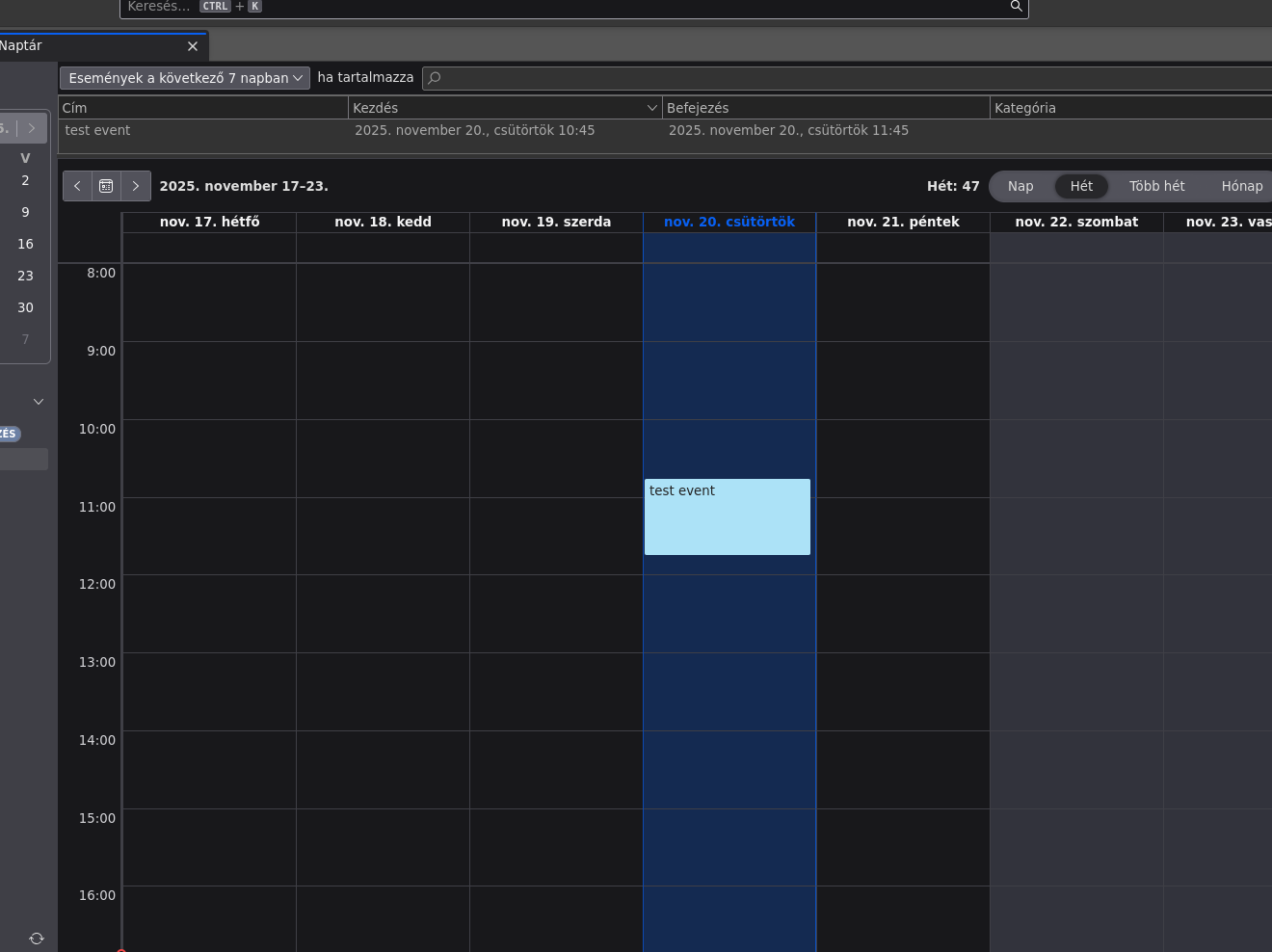
Just for the sake of the demonstration, look at the server console:
root@debian:~# tree -L 5 /var/lib/radicale
/var/lib/radicale
└── collections
    └── collection-root
        └── myuser
            ├── 5b4cb807-d8e8-4b84-19f5-cdc15c4adeda
            └── fd890608-5fac-adf1-cfdd-29234b74e294
                └── df475d24-1419-44f1-aa50-8c8c60134c53.ics

6 directories, 1 file
There’s an ics file really
Now on Android, I set up DAVx5

Please ignore now my existing account, that is for my real calendars etc. Focus on the “+”!
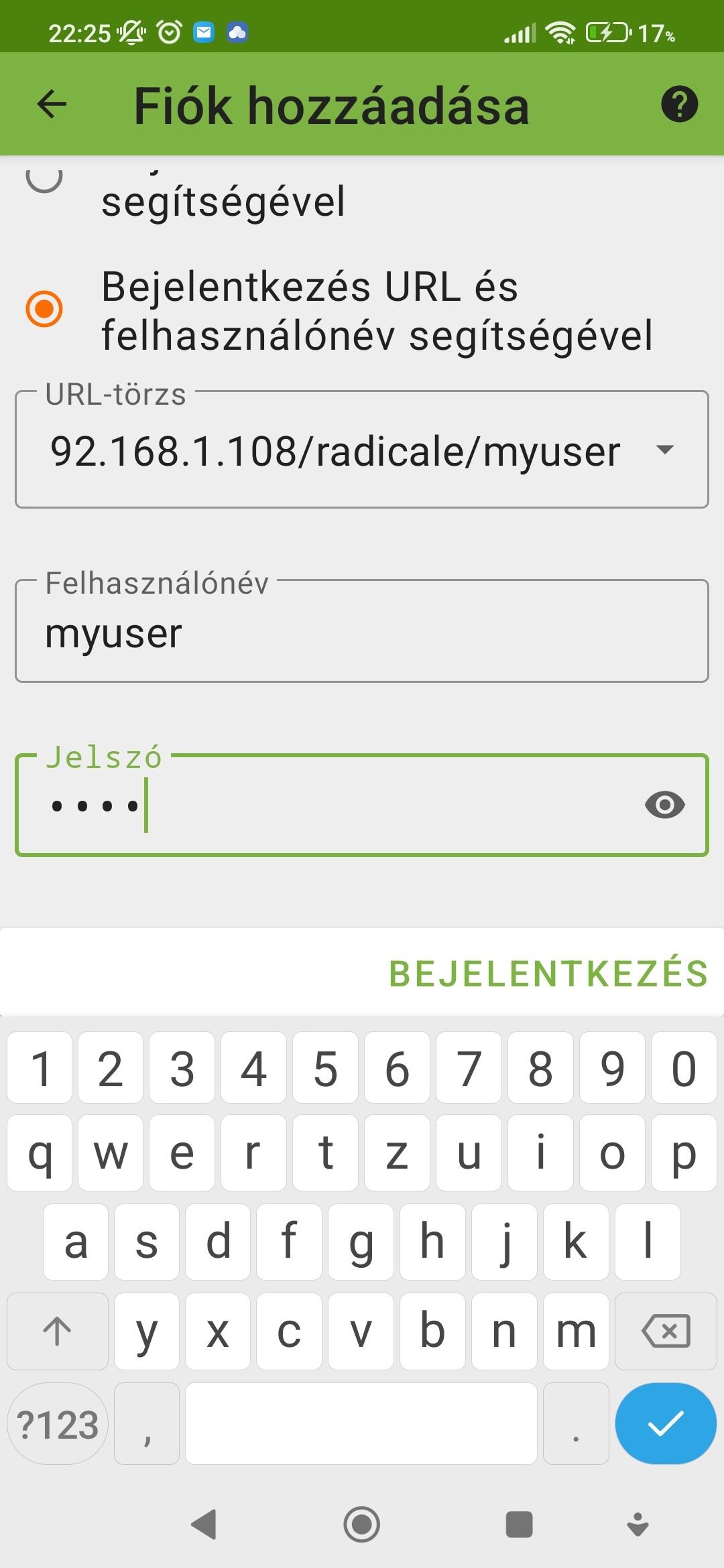
Choose the option to login using URL and credentials, enter the values, then click “Login”.

After successful login, add the new account, click “Add account”.

By default collections are not synced, check them to be active and synced:

After synchronization entries will be there in your devices calendars, etc.
This is how it looks in Ethar for me:

Please ignore the mess in my other entries, just note that there’s the “test event” on 20. November, what I created using Thunderbird before.
Using Opentasks (available on F-Droid OpenTasks | F-Droid - Free and Open Source Android App Repository) it is possible to manage tasks on theRadicale instance.
Hopefully I did not forget something vital from this writing, but if you are stuck somewhere let me know!
I did not cover the SSL part, that involves Let’sencrypt, certbot, and some NGINX configuration, but before that it is required the server to have a FQDN, so a DDNS provider is necessary (dynu.com for example  ), port forwarding to the server (setup on the router), to maintain the DDNS entries there’s either something to setup on the router or some (installl and) configurations of ddclient on the server.
Now I wanted to focus only on Radicale.
That’s it for now, have a nice install! 
Disclaimer: this stuff was written using only N.I. (natural intelligence), absolutely no AI involved. Of course I used knowledge available on various different sites, but any mistakes presented here are solely my own mistakes.

 ) but perhaps we need instructions for non-systemd setup (like enabling & starting services). I’m sure