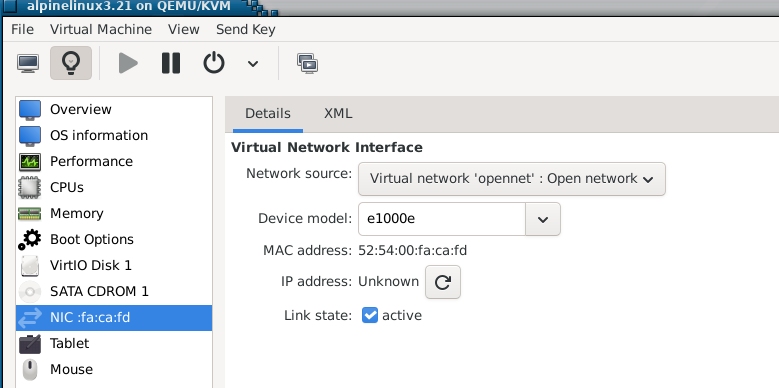
Virbr0 is the network bridge. It’s default configuration is NAT Mode (supposedly it can be configured to Bridge Mode).
-netdev bridge,id=hn0,br=virbr0: This specifies a network backend of type bridge with the ID hn0, connected to the bridge virbr0 on the host. In QEMU, the bridge netdev type typically uses a TAP device under the hood to connect the VM to the specified bridge (virbr0). QEMU automatically creates a TAP device (e.g., tap0) and attaches it to the bridge (virbr0) when the VM starts, unless explicitly configured otherwise.
QEMU defaults to SLIRP (user-mode networking) when no explicit network configuration is provided in the command line. SLIRP allows VMs to access the network (e.g., the internet) without complex host setup, making it ideal for casual or quick VM usage. The VM is isolated from the host’s LAN, so it can’t use the host’s actual IP or communicate with other LAN devices directly. You are probably dealing with SLIRP
I cant see any tap device at moment. It must only happen when you create a bridge.
I will try your netdev option… I need to get on top of this business of networking VM’s… both learn how to setup things, and understand how it works.
You are talking about virt-manager’s virbr0 there?
Yes it is a bridge, of sorts. It makes the VM’s virtual network visible to the host. But there are other types of bridge. The word bridge has too many meanings. What you mean by Bridge Mode is something that works like a traditional hardware bridge, connecting two networks with full access permissions? Correct?
We need a better vocabulary here.
Correct- Also I’m learning a few things I didn’t know- I’ve always dealt with linux. This is what i just found- Systems like linux QEMU will create a TAP interface and attach it to the specified bridge . However, on NetBSD, QEMU does not automatically create the TAP device when using -netdev bridge. Instead, it expects a pre-existing TAP interface (e.g., tap0) to be created and configured by the user.
Yes I have looked at that, but I did not know how to interpret it , or whether I needed it.
OK, so Netbsd qemu is different to Linux qemu.
That is why I found different howtos compared to,Linux.
I think my previous statement needs modifying… virbr0 is a tap interface plus some rules (ie the NAT rules)
OK next question… why do I need the rules? Why cant I just use tap0 an nic the same as I use eth0?
I found this
" Yes, you can use a TAP0 interface without creating a bridge, but it will function as a standalone virtual network interface, not as a seamless extension of your physical network. You can assign it an IP address and route traffic to or from it, but it won’t automatically connect to other devices on your physical network without a bridge or other routing mechanisms."
That was google AI.
I think I will start with that. Then when I understand that much, I might be able to grasp what a bridge adds and when one might use it?
BUT
If I just create tap0 in NetBSD, how will it be attached to the VM? It will be a free floating nic, attached to nothing? I need to create it from within qemu, so it knows what machine it is plugged into.
By specifying -netdev tap,id=net0,ifname=tap0 in the QEMU command, QEMU opens /dev/tap0 and connects it to the VM’s virtual NIC (e.g., via -device virtio-net-pci,netdev=net0). This links tap0 to the VM, ensuring packets from the VM’s virtual NIC go to tap0 and vice versa..
My analogy of TAP would be it is like virtual Ethernet port on the host, with one end plugged into the VM and the other end available for the host to route, bridge, or process packets.
Something that gave me problems initially were permissions- Since most of the time qemu is run as non-root user (which is preferred) You tend to run into permission problems that need to be addressed. (eg Changing permissions on /dev/tap0 to allow your user to access tap0)
Yes, I see it that way. If we push the analogy a bit further, it is like an ethernet card… the pin side of the card is seen by the host, and the cable side of the card is on the same network as the VM
I had just about arrived at that after trying other things that failed
In our analogy, that is the bit that makes the cable connection to the tun interface, from somewhere on the VM’s network.
I will do it this simple way first. Thanks.
I actually have to run it as root, because I am accessing a raw disk device.
I did have to reboot… But on re-boot - my KVM vms now have full LAN and WAN (i.e. the intertubes) access - through a second USB 3 gigabit ethernet adaptor…
I actually have several quad gigabit PCIe ethernet cards - I might try one…
NEVER EVER touch this again (famous last words )…
My shell history :
 7923  sudo nmcli con add type bridge ifname br0 stp no bridge.mac-address 00:e0:4c:68:01:51
 7924  sudo nmcli con add type bridge-slave ifname enx00e04c680151 master br0
 7925  sudo nmcli con mod bridge-br0 ipv4.method auto
 7926  sudo nmcli con up bridge-br0
Before reboot - KVM guests weren’t getting a DHCP lease - and the state of “br0” was “NO-CARRIER” - on reboot :
╭─x@titanii ~
╰─➤  ip a show br0                                                                                                      255 ↵
5: br0: <BROADCAST,MULTICAST,UP,LOWER_UP> mtu 1500 qdisc noqueue state UP group default qlen 1000
    link/ether 00:e0:4c:68:01:51 brd ff:ff:ff:ff:ff:ff
    inet 10.0.0.109/14 brd 10.3.255.255 scope global dynamic noprefixroute br0
       valid_lft 172260sec preferred_lft 172260sec
    inet6 fd00::1bb8:979e:9cf:1c10/64 scope global temporary dynamic
       valid_lft 22sec preferred_lft 22sec
    inet6 fd00::db2:dbfc:c0ac:5fad/64 scope global dynamic mngtmpaddr noprefixroute
       valid_lft 22sec preferred_lft 22sec
    inet6 fd6b:b860:7838:3246:f2b9:72c3:9128:dd8e/64 scope global temporary dynamic
       valid_lft 1741sec preferred_lft 1741sec
    inet6 fd6b:b860:7838:3246:4e1f:e191:3fc3:3a35/64 scope global dynamic mngtmpaddr noprefixroute
       valid_lft 1741sec preferred_lft 1741sec
    inet6 fe80::a67e:2c81:810f:1fef/64 scope link noprefixroute
       valid_lft forever preferred_lft forever
And my lightning fast Artix guest now gets an IP address from my router (it was doing this also with Macvtap) - but - from my KVM host - I can ping and ssh to the guest… That’s all I wanted… i.e. I wanted my VMs to seem like an actual device on my ethernet LAN (which also includes my WiFi).
I just noticed RHEL 10 is now “out” - so - I got a DVD of it, but also a qcow2 image for KVM. I have a “developer” account with Red Hat - which lets me download, but also - register up to 16 developer machines / vms running RHEL. So - next “cab off the rank” will be a RHEL10 kvm guest…
I actually have several quad gigabit PCIe ethernet cards - I might try one… I last used them when I had a managed switch - and I could aggregate ports on my ESX machines (also ran OVM - Oracle Virtual Machine [NOT “VirtualBox”] which uses XEN hypervisor) and also aggregate ports on my NAS (FreeNAS at the time). I can’t do Link Aggregation any more as my gigabit switch is “un-managed”.
Then I can boot the guest.
but
I cant ping the host, and DHCPDISCOVER failed on eth0 during the boot so I have no internet in the guest.
Progress:
It would seem if I use -netdev tap the eth0 interface in the guest does not get configured automatically. … so in the guest
ip addr add 10.0.2.15/24 dev eth0
Guest can ping the host on 10.0.2.1 , and guest has a default route 10.0.2.0
Host can ping the guest on 10.0.2.15
That is maybe enough for my Netbsd project, but I am going to continue and see what else can be done with a plain tap link. I feel that a few route table entries in the host should make it do anything a bridge can do. … Lets see.?
Building (or “composing”) an image - you can actually set the locale, timezone, language, keyboard etc during the image build… But you always change that later on… It also lets you create a user (but enforces 2 char minimum for username) and push your SSH public key into the image.
T
here is an option to set custom partitions too - but I just go with defaults… Which probably means I can’t apply a CIS1 or CIS2 hardening profile - but I don’t want that stuff anyway… Default is a 10 GB “/” with everything hosted on that… I can work with that… If I want to add storage later - I know how to do that…
It’s not really much different than getting an RPi image of Raspbian for a Pi device…
With the RPi imager tool (there’s Mac, Windows and Linux versions) you can do a few things before the image gets written to the media (e.g. SD-Card, USB drive) like set the WiFi country, create a user, insert your SSH public key.
But that RedHat composer thing is pretty neat actually.
I’ve done that before maybe 10 years ago, with OpenSUSE image builder…
It’s easier with Raspbian to change stuff later on with “raspi-config” a TUI console app (but the Pixel desktop also has GUI interface to do that stuff) - which is by design as they’re geared towards education.
With RHEL - if you want to change stuff later on - you have to learn various CLI tools like “timedatectl” and manually edit files like chrony.conf…
DAMN! That reminds me - I used the RHEL composer to make an RHEL 9 image and forgot to download it - they’re ephemeral - you have to download it within 6 hours…
guest can ping anyting on my private local net (192.168.32.0) via port enp16s0 on the host
other machine on my private net can ping the host , but not the guest. This is fixed by providing a route in that private net machine
`ip route add default via 192.168.32.6’ ( the hosts IP on the local net)
The private net machine can now ping the guest.
if I try to ping something on the internet from the guest, it does the DNS lookup and gets the IP, but does not connect?
I dont understand that?
I’ve never messed with open network, but my understanding is that you must manually set up routing and firewall rules to allow traffic from the VM to the internet. So possibly the problem is the routing or firewall configuration on the host. Getting into things I haven’t really ever looked at- but I think those might be different protocols -Standard DNS queries use UDP/53 vs Ping uses ICMP vs Web Browsing TCP
Thank you. I will see what the firewall situation is in the host. It will be whatever the default is for Void Linux.
The host has a default route, to the internet connection. Any packet it cant route should go to the internet… but it is not routing the packets sourced from the VM? Maybe I need to define a gateway?
All I am trying to achieve is to learn how to do things without a bridge, because then I may be able to understand how a bridge works.
And my work around for “another machine on my private net” (using NAT) to get to the guest VM - use ProxyJump argument in ~/.ssh/config… But that was cumbersome…
Proper host based bridge mode works best - the best of both worlds… and very similar (end result) to bridged network in VirtualBox - but better - 'cause it’s KVM and my kernel is already hypervisor aware…
And I’m fortunate in that I can use a 2nd gigabit NIC for the bridge…
 )…
)…