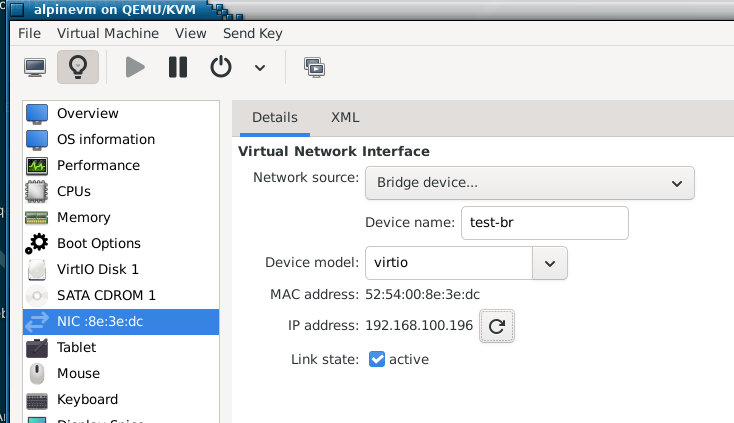
I have both, a bridge “nm-bridge” which I manually created, and a virtual-bridge - vibr with libvirtd created…
╭─x@titanii ~/BNZ/LINUXISO/Debian/Trixie
╰─➤  ip a
1: lo: <LOOPBACK,UP,LOWER_UP> mtu 65536 qdisc noqueue state UNKNOWN group default qlen 1000
    link/loopback 00:00:00:00:00:00 brd 00:00:00:00:00:00
    inet 127.0.0.1/8 scope host lo
       valid_lft forever preferred_lft forever
    inet6 ::1/128 scope host noprefixroute
       valid_lft forever preferred_lft forever
2: enp39s0: <BROADCAST,MULTICAST,UP,LOWER_UP> mtu 1500 qdisc fq_codel state UP group default qlen 1000
    link/ether 2c:f0:5d:74:48:b8 brd ff:ff:ff:ff:ff:ff
    inet RE.DACT.E.D/14 brd 10.3.255.255 scope global noprefixroute enp39s0
       valid_lft forever preferred_lft forever
3: wlp41s0: <BROADCAST,MULTICAST> mtu 1500 qdisc noop state DOWN group default qlen 1000
    link/ether 68:54:5a:d3:53:74 brd ff:ff:ff:ff:ff:ff
4: virbr0: <BROADCAST,MULTICAST,UP,LOWER_UP> mtu 1500 qdisc noqueue state UP group default qlen 1000
    link/ether 52:54:00:16:f9:68 brd ff:ff:ff:ff:ff:ff
    inet 192.168.122.1/24 brd 192.168.122.255 scope global virbr0
       valid_lft forever preferred_lft forever
11: enx00e04c680151: <BROADCAST,MULTICAST,UP,LOWER_UP> mtu 1500 qdisc fq_codel state UP group default qlen 1000
    link/ether 00:e0:4c:68:01:51 brd ff:ff:ff:ff:ff:ff
22: vnet6: <BROADCAST,MULTICAST,UP,LOWER_UP> mtu 1500 qdisc noqueue master virbr0 state UNKNOWN group default qlen 1000
    link/ether fe:54:00:23:b1:f8 brd ff:ff:ff:ff:ff:ff
    inet6 fe80::fc54:ff:fe23:b1f8/64 scope link
       valid_lft forever preferred_lft forever
26: nm-bridge: <NO-CARRIER,BROADCAST,MULTICAST,UP> mtu 1500 qdisc noqueue state DOWN group default qlen 1000
    link/ether 96:c9:66:3b:45:ee brd ff:ff:ff:ff:ff:ff
    inet RE.DACT.E.D/14 brd 10.3.255.255 scope global dynamic noprefixroute nm-bridge
       valid_lft 96460sec preferred_lft 96460sec
    inet6 fe80::a50c:11e5:b617:5d62/64 scope link noprefixroute
       valid_lft forever preferred_lft forever
enp39s0 is my default NIC in my desktop… on my motherboard…
enx00e04c680151 (what a mouthful!) is a USB 3 gigabit ethernet dongle - it doesn’t have an IP address “by design” - as it’s a part of my bridge “nm-bridge” - which does get an IP address (via DHCP from my router) on my main ethernet LAN.
Note : while vibr0 is called a “bridge” - it’s more of a NAT / firewall / router thingie…
If I ssh from my RHEL9 guest VM, using kvm/qemu NAT - to my FreeBSD/TrueNAS, and I type “who am i” my IP address is that of my desktop machine, not the VM. If I try to use “nm-bridge” for my guest - it cannot get to my FreeBSD NAS…
I think you need virbr1… created by virt-manager as a routed network.
You should not link virbr0 to a physical device, but virbr1 should be able to be linked.
and
Your nm-bridge is not, I think, the way to go with virt-manager… you have it for another purpose?
I have made a fresh Void install with virt-manager , just to test this. … so I cant damage my real virt-manager setup. … I will give it another try linking to enp17s0 which is my local static net.
Yeah - I’m using vibr0 (not “vibr1”) - that’s what I used first off before I decided I preferred “Bridged Adaptor” like I can use, easily, with Virtualbox…
Being unable to get Bridged Adaptor working is not a showstopper - not enough to make me jump back to VirtualBox…
I prefer the idea of using my built in hypervisor “kvm” in my kernel…
So - the issue isn’t enough to make me jump back to VirtualBox… I just wish it was easier…
Go to the main virt-manager window.
Go to connections
It will show you the “default” network
Use “+” to ask for a new connection
It will offer you several types… I chose “routed”… there is also tap
It then gives a subwindow to configure “routed”
When you finish the host should show virbr0 and virbr1… may have to reboot.
The guest will still have eth0 as virbr0’s address… ie it defaults to NAT… you can switch it to “routed” in the guest screen menus… then eth0 will have virbr1’s address and there will be no NAT,… you can still ping host from guest and vv, but to ping it from elsewhere we have to master this business of getting virbr1 onto a physical network.
OK - may try that later (early next week)… So with a routed vibr1 - I should be able to get to my VMs from other VLANs / IP networks?
Brain is frazzled, been doing NIC bonding on fibre NIC ports for the last 3 days (in Oracle Linux 8)… I was bashing my head against the wall telling the network engineer there was something wrong on the 2nd interface to bond (wasn’t showing a connection - i.e. status was “NO-CARRIER”)…
When the network engineer was onsite this morning - he moved that non-working 2nd fibre connection to the same physical card (4 port Fibre card) - it stopped displaying “NO-CARRIER” and then bonding suddenly started working…
Thank god for “nmtui” - because I was doing all this in the virtual KVM over IP - and the remote TTY console doesn’t support copy+past to/from…
chose routed in main virt-manager connections menu
added a physical interface to virbr1
ip link set enp17s0 master virbr1
ip addr flush enp17s0
ip addr add 192.168.32.6/24 dev verbr1
ip link set virbr1 up
ip route add default via 192.168.32.1
result is behaves just like the NAT interface… host and guest can ping each other but nothing else can be seen
So I swallowed my pride and tried a bridge
make a bridge
ip link add test-br type bridge
add enp17s0 to bridge
ip link set enp17s0 master test-br
ip addr flush enp17s0
add address of enp17s0 to bridge
ip addr add 192.168.32.6/24 dev test-br
ip link set test-br up
then nothing works… I cant even ping host from guest or vice-versa
The VM definitely knows about the bridge
# virsh domiflist alpinevm
 Interface   Type     Source    Model    MAC
------------------------------------------------------------
 vnet0       bridge   test-br   virtio   52:54:00:8e:3e:dc
but it cant communicate via it?
OK, I give up for now.
Clearly I dont know enough about bridges or routing or something?
I have my doubts about that last route step… it makes 2 default routes in my machine… I tried omitting it … no different.
Did you guys ever figure this out? I do not know if this will help, but- I have a dual-boot system (The Host) that I wanted to keep the same static IP addressed assigned to. I play around with Vbox, Virt-Manager,& Qemu. What I did was make a bridge and enslaved the physical Ethernet interface to it (I created the bridge with the same MAC address as the physical Ethernet interface ). I’m using Ubuntu 22.04 and Network Manager. The Host machine keeps the same static IP assigned by the router & All VMs can attach to the bridge etc….I also wrote a script to turn the bridge on or off since my Host only has one physical Ethernet interface and I play around with VMs but do not need them all the time. I would be happy to go into more details on exactly how I set it up.
this is a brief summary-
Create the “br0” bridge with the same MAC address as enp6s0 (my physical Ethernet interface name): So replace the MAC address and “enp6s0” with yours.
sudo nmcli con add type bridge ifname br0 stp no bridge.mac-address d8:5e:d3:0e:a0:25
sudo nmcli con add type bridge-slave ifname enp6s0 master br0
sudo nmcli con mod bridge-br0 ipv4.method auto
sudo nmcli con up bridge-br0
Then be sure to Disable any conflicting connections (e.g., “Wired connection 1”):
sudo nmcli con down “Wired connection 1”
sudo nmcli con mod “Wired connection 1” connection.autoconnect no
You are bridging to the same physical ethernet interface that is used for your internet connection. Why do you need to do that? Do you wish to connect to the VM’s from somewhere on the internet? or perhaps from other machines connected to the modem?
I tried (and failed) to bridge to my local network, which is a separate physical interface not connected to the internet… because I wanted to connect to VM’s from other machines on my local network. My local network has a static IP.
Otherwise, what you are doing is the same as I tried. I notice that you did not use a tap interface. I always thought that was unnecessary.
I dont use NetworkManager, but I will try and follow the way you set it up using ordinary ip commands.
I think @daniel.m.tripp had more success than I had, but he used a tap interface.
Just playing around mostly- With one network card- It lets them act like their own machines on my home network, grabbing IPs from my router. Plus, I can mess with my router’s port forwarding to reach them from outside when I want. However I also have the choice to just use NAT because of libvirt (virbr0) on my Host machine. I did write a script to turn the bridge on or off since my Host only has one physical Ethernet interface and I play around with VMs but do not need them all the time.
I used the MAC address because I wanted the same static IP assigned to my host computer by the router When the bridge was running or not- so the same MAC address is assigned to br0 so it replaces the physical interface (enp6s0) -
There are minor tweaks you can do to get Qemu to use virbr0- I’ll try to explain if you are interested.
The bridge might inherit the slave’s Mac address- most cases it probably should, however it can depend on kernels, network tools, etc.. Since it is not a strict rule-by assigning it, it does away with any uncertainty.
Please do. I am currently using qemu inside NetBSD. By default its guest has internet connectivity, but it can not talk to the host. I need host/guest communication. Do you have any suggestions.?
Update:
I made some progress tonight.
If I use -nic user,mac=c8:.....:28, model=e1000 , on the qemu command line,
In the guest I can ping the host, and the interface eth0 has an IP number 10.0.2.15
and there is a default route via 10.0.2.2. The mac address was necessary.
but
In the host, I can not ping 10.0.2.15, and there is no virbr0 interface.
It is becoming clear that nothing I do on the qemu command line is going to setup networking in the host. The host networking has to be setup by hand. qemu can only setup the guest (unlike virt-manager)
Mixed success… i.e. with Macvtap bridged - my VMs get an IP address from my router DHCP - but I cannot connect (e.g. ssh) to them from the host - but - from other machines on my LAN - I can…
I actually had proper NetworkManager bridged network working from KVM… i.e. with two NICS - one for my main connection on my desktop (unbridged), one dedicated to KVM (bridged). I could SSH to them from the KVM host, and from any other host on my LAN.
NIC1 : enp39s0 (on my motherboard)
NIC2: enx00e04c680151 (USB 3 gigabit)
Was working until I fiddled with my USB NIC thinking it was the USB gadget interface on a Pi Zero plugged into USB port… and it all broke and I haven’t been able to figure out how I got it working in the first place, or fix it.
I think what @JoelA is doing - is 'cause his machine only has one NIC… Not necessarily anything to do with internet access…
I will give @JoelA 's suggestion a try-out… But I will use one of the two USB3 gigabit adaptors I have…
So - both nat and macvtap bridge do part of what I’d like - but - not the same as proper bridged mode like you can out of the box with VBox…
Qemu uses a file called “qemu-bridge-helper” which need to be set to the correct permissions- it also looks at a file called “bridge.conf” to see what is allowed. NetBSD is a little different in file locations. I think they are at /usr/pkg/libexec/qemu-bridge-helper and /etc/qemu/bridge.conf (the conf file might need to be made) Also I believe NetBSD uses the group is wheel vs kvm. Please double check that this looks correct for NetBSD - I adapted it using what little I know of NetBSD- but hopefully you will get the gist-
So basically - to get it to connect to libvirt’s virbr0
Set Permissions on qemu-bridge-helper: Ensure ownership and
setuid bit (4755)
I cant do it that way. NetBSD does not have virt-manager(libvirt). I have to figure out how to make qemu setup virbr0?
From reading last night, I think I have it… I should use -nic tap on the qemu command line. I will try it out later today.
Thank you very much for the detailed account on how to bridge with virbr0 and qemu. I am not sure whether I will need a bridge in this case… virbr0 may be sufficient… but I need to do bridges elsewhere. That info about permissions and config files is not easily found.
It would seem that virbr0 IS a tap interface and one can use it directly to make a bridge. A number of accounts I read about bridging suggest creating a tap interface… that always seeemed unnecessary to me… you already have one if you are using virt-manager.
What I am trying to do here is to setup a Linux VM inside NetBSD to provide some of the Linux features that NetBSD does not possess. It is part of my little project to demonstrate that NetBSD is a workable desktop alternative.