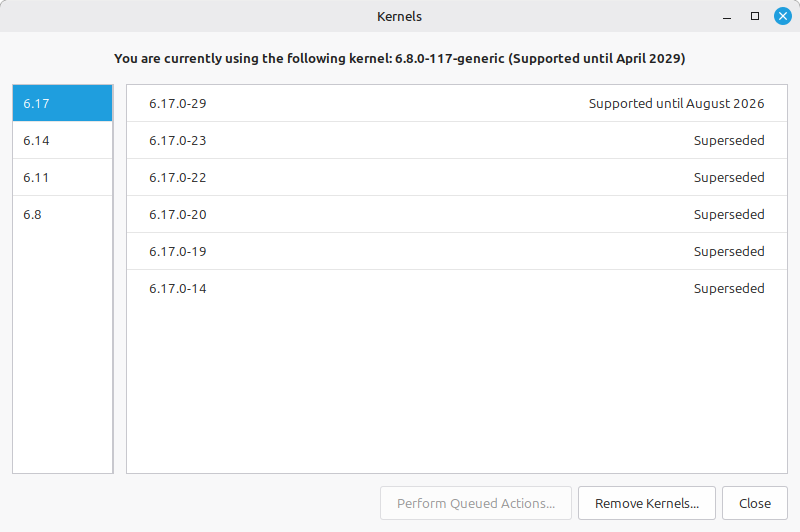
On an old Desktop (i5-4670 + 16GB RAM) when I check for updates I get updates for both kernels 6.8.0 and 6.17.0
The system is running by default on 6.17.0 but switching to 6.8.0 also works perfectly (as I expected since there is no new hardware on this PC)
Are there any advantages on using a newer kernel? Is there a way to remove 6.17.0 completely and only get updates to 6.8.0 (which is a long support kernel)?
Kernel 6.8 is perfectly fine for your older desktop. You would only need 6.17 if you are having problems with kernel 6.8 or if you had much newer hardware.
To stop getting updates for kernel 6.17 you could try this. Open update manager, view, then Linux kernels, continue, and select 6.17. Select each 6.17 kernel you have installed and click remove. With no 6.17 kernel installed, Mint should not send you any more updates for this kernel release.
I am on Mint 22.2 and only have kernel 6.8 installed and I do not get updates for other kernels. BTW, 6.8 runs fine on my laptop with an i5-1135G7.
Yes and no … With the update manager in linux mint, it tells you that there are updates available, if you click the icon by the time stamp bottom right, the update manager appears, you can then click refresh to update that list but normally not needed. You then have the list of what is going to be updated, using that you can select do this one and not that one from the list. So yes you could exclude one you don’t want.
Personally I would advise against unselection of one or any.
For 3 reasons
Dependency, some updates trigger the update of a Dependency either update or removal
Kernel updates are usually so small. And so quick to do not worth the effort to exclude
If the system goes wrong for any reason, the mint recovery mode allows you to go back a version of the Kernel, experiance has shown that on odd occasions I have needed to do it. Ok not often and mate gets better and better. Cannot remember the last time I needed it, but prefer a fall back without trying timeshift or similar.
Just my personal thoughts and experience with mint.
If you right click on an update, it will give you 2 options.
1 - Ignore the current update for this package.
2 - Ignore all future updates for this package.
Thank you for your suggestion Alfred @abu ! But instead of freezing I removed all 6.17.0 kernels now. So far so good. I have the currently loaded kernel 6.8.0.117 and the previous 6.8.0.111 as options in Grub. This raises one additional question: I can see why Mint keeps the LTS kernel (6.8) and the latest (6.17) as options in the Kernels options. But why does it keep 6.11 and 6.14 which are now End of Life?
Thank you for the search, Howard ! But my question is still: why? If they are EOL, meaning no further development or fixes, and the new version includes all the good stuff plus additional drivers and fixes… What is the point of keeping them? Isn’t it just confusing?
I asked ChatGPT your question, maybe this will give you a good answer.
" Linux Mint shows some kernels that are already upstream EOL because Mint/Ubuntu kernel management is based on the Ubuntu packaging lifecycle, not strictly the upstream kernel.org lifecycle.
Here is what is happening:
6.11 and 6.14 were interim Ubuntu HWE kernels
Ubuntu shipped them temporarily during hardware enablement transitions
Mint inherited them from Ubuntu repositories
Even after upstream Linux declares them EOL, Ubuntu may still:
keep packages visible
keep them installable briefly
provide limited maintenance during transition periods
So Mint may still display them even though they are no longer recommended long-term."
Not sure what Mint does, but Void Linux keeps every variant of every kernel it ever downloaded. I have to manually delete kernels about once a year. Void has a special command for removing kernels. Not sure what Mint has.
My point exactly, you may need to go back at some stage and they cost nothing to keep given the size of disk storage.
If you check a kernal size they are around 1.5 gb. Check your disk space before and after removal to see what difference it makes, almost nothing on a 1 tb disk. Ok newer kernal are getting larger in size but still not a problem.
So do Red Hat based distros (e.g. RHEL or Fedora or CentOS) - but it’s so long since I did that I can’t remember what the command was…
It’s important to ensure old kernels are removed from GRUB…
Yeah, they clutter the grub menu, and will not boot if they have been removed.
It is also important to see new kernels are added to grub … easy in single boot, but you need to be careful in multi-boot.
Actually I disagree. Keeping available for installation kernels which are EOL (meaning that any security issues present in these will not be patched) could lead to an inexperienced user installing them just out of curiosity and open the door to hackers…
If I understand correctly, they are there because Ubuntu has them and nobody considered this a problem. In my perspective I think LM should not make it so easy to install EOL kernels.
Thank you all for your contributions and particularly to Howard @easyt50 for providing a quick and accurate solution! All the best!