English works like AI … if absorbs everything and redistils it.
3 Likes
Ok - since most everything was in French, even picking American English, I couldn’t get past the initial install screen. Never got far with it. Not going to put it on bare metal, I didn’t like what I was seeing, at all.
1 Like
I thought all this discussion of Francais was about a browser - but I assume it’s in reference to GLF-OS…
Just installing it in a VM now (I will now have 26 VMs in KVM/QEMU via Virt-Manager - I think I need to do some housekeeping)…
When you boot - you can select English - but then when the DE starts (Gnome 5 I think) - it reverts to French again - but - on the >LEFT< pane of the install pop-up (Location?) - you can then select English and it will show English labels for things like Install or Cancel…
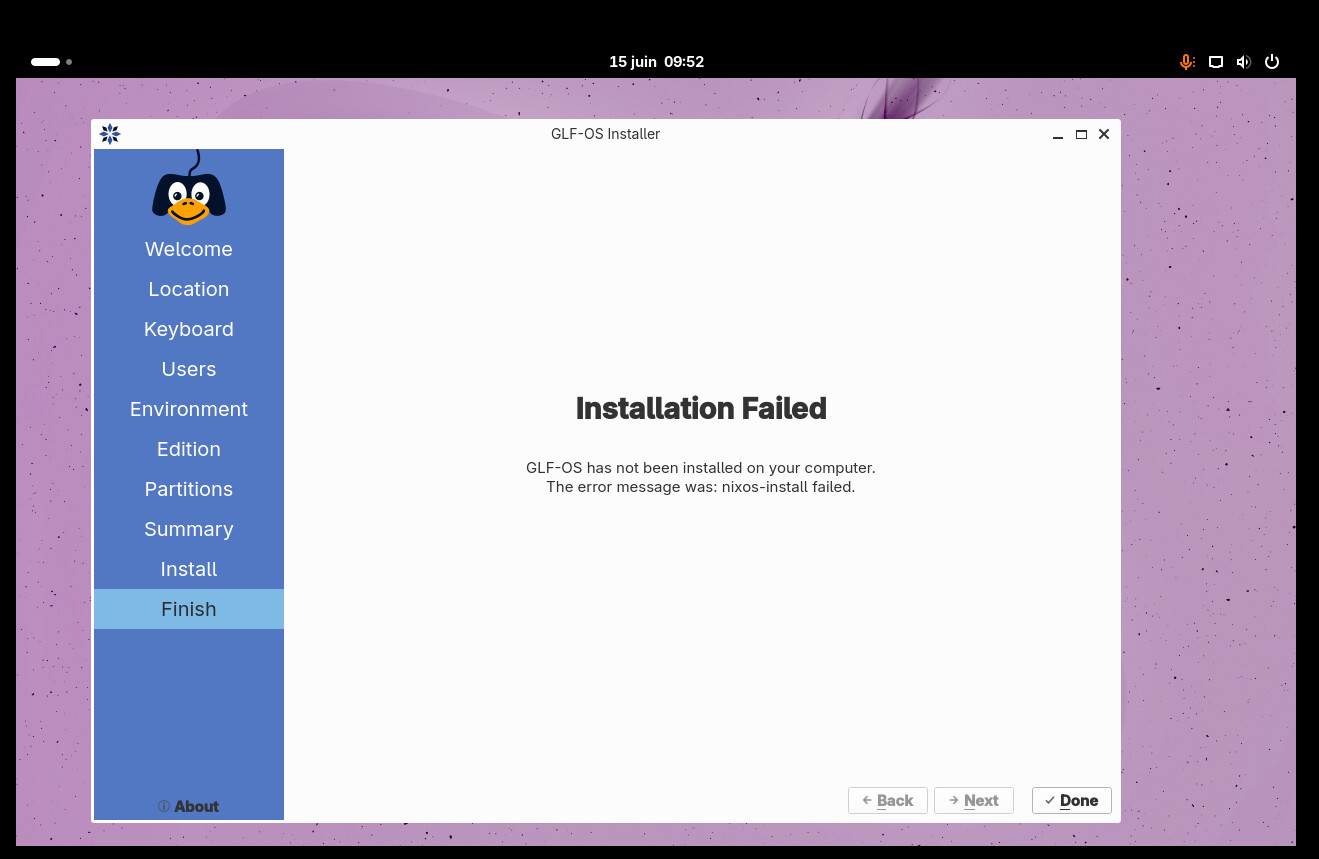
But it ran through the installer and failed (but no indication of what bit failed!) :
I did three years of French in high school - last of those years was 1977 - so a half century! I remember enough stuff to figure somethings out… But not everything…
Anyway - even if you figure out which language (in the live image booted off the ISO) and pick English (UK) - ALL the menu items and launchers from the dock/dash are still in French…
Shame - nice to have Steam already installed - and other gaming stuff… But I’ll probably delete the VM - too problematic if it fails to install (and doesn’t tell you why) and even when you select English - everything else is still in French!
In other news - fired up my work MacBook (MacOS 26 “Tahoe”) this morning for the first time in a fortnight and Brave is showing “damaged or incomplete” - so I renamed the app in the /Applications folder - re-installed and it got blocked again - and only after that - did I see Falcon Crowdrstrike popup that the DMG (common installer format for MacOS) was blocked… How ironic - Falcon Crowdstrike killed VAST swathes of the internet 2 years ago - HOW DARE THEY BE SO PRECIOUS!
Anyway - I assume that’s a Crowdstrike policy from my employer… Bugger!
Never mind - I don’t use that MacBook “for pleasure” anyway… Brave is working fine on my personal MBP running MacOS 15.6 Sequoia…
1 Like
I installed Brave Origin seems ok,now i use it as my default browser and proton pass with it
2 Likes
Google , brave .
1 Like
Firefox (as supplied by the Mint Team), together with periodic security updates from Mint.
I also have Chrome installed (but not used) and a script that uses a text mode CLI browser (lynx).
Firefox searches are protected by DuckDuckGo.
1 Like
Hi and welcome to our site.
We look forward to your contributions and being part of our community
2 Likes
This is strange i cant get to Distro watch with Firefox but with Brave origin i cant get to distro watch i get ERR_CONNECTION_RESET .
1 Like
We had a discussion of that recently.
It is something to do with the info a browser returns to the website telling it what browser and what OS.
Some websites (eg distrowatch) reject certain browsers and OS’s
I forget the name for it, but you can change it.
2 Likes
Nope. That’s a new one for me.
3 Likes
Sounds close to what I got a few months ago.
4 Likes
This seems to be the browser thread. I just overhauled my daily driver, MODICIA OS. I made Brave Origin the default browser, since it seems to be the most functional and stripped-down browser out there. No Google, no forced AI, and FREE to Linux users. Fast and snappy.
5 Likes
It must have a search provider?
I find google to be the best search provider … how do I use that without copping the rest of google?
1 Like
I am not a fan. It sounds like you aren’t really either but use their search anyway. Reasonable.
I’m not as reasonable. I’m too bitter from the days of Yahoo. I honestly never saw how Google results were significantly better than Yahoo.
These days I use Bing because I use Edge as a browser. If I don’t find good enough results for a search I try a few others before I ever search Google. It’s been over a year, I am guessing, since I’ve searched Google.
Maps is a different story. I use Bing Maps by default too. But for Street View and a few other things, like Android Auto, I do use Google Maps.
2 Likes
Yeah.
I guess I sort of accept our googified lifestyle and enjoy the benefits
I would like to see it not be such a monopoly, but the privacy issues do not worry me.
Google Scholar is a useful search of scientific literature.
3 Likes
Simply change the search engine. I delete Google and choose DuckDuckGo. It serves my needs quite well and allows me to ignore Google totally. Every browser I’ve tried gives this choice.
4 Likes
I find Google’s results are usually the most immediately useful to me as well, so I use SearXNG. It’s a metasearch engine and you can choose which search engines you want included in the aggregate, weight them according to your preference, and other fun customisations. Plus, it’s a FOSS project. You can use a free public instance or self-host.
3 Likes
I have heard of it, but never tried. It may be worth a look.
It does seem to have a better privacy profile.
DDG is reasonable too. Their AI summaries are not as good as google
2 Likes
I host SearXNG at my house.
But I select a combination of search engines that does not include Google. Each person can customize their search engines and a few other options.
3 Likes
Me too. I ran a search on my instance and yours; looked like pretty similar results. We both seem to like startpage results. I self-host a couple of things on my VPS, but SearXNG has definitely been the easiest. Don’t think I’ve ever had an issue - touch wood.
4 Likes