There are too many distros that work well to waste time with AntiX and other headaches. I’m pretty convinced that MODICIA may be one of the best.
Firmly agree with that
We agree to disagree.
I prefer to spend time learning one difficult distro, rather than looking at several easy distros.
Linux is about choice… your choice as well as my choice.
@callpaul.eu
Same to you
I prefer to invest my time exploring distros NOT burdened with shortcomings. Iso files which don’t work, installation routines that are less than intuitive, partitioning schemes that hog an entire disk, and documentation that falls short of comprehension–these are shortcomings.
That is why I run W11 and play with Linux!!! So I can only guess as to what you think of Gentoo and LinuxFromScratch!!!
Think many here feel the opposite by running linux not windows. But all comes down to personal choice and why we take different roads in life.
Hi Bill,
I like your approach, but it. is not for me.
Surely you did not have trouble with MX? It is reliable like Mint.
Neville
I did it like fixing an unknown carburetor. Washed the bench. Scrubbed out the Ventoy program and files. Used Balena Etcher to load a fresh download of AntiX onto a clean usb.
And it all worked. Using it now. Best I can tell is that my Ventoy stick was corrupted somewhere. The old ways are the best: clean up, back up, start up from fresh.
Please forgive me for unwarranted assumptions.
I also installed MX on a small partition, just to prove the concept. That worked, too.
I have never used Ventoy but it seems to be a source of problems? Use dd. It’s easy and it works! Sync and umount the USB stick before detaching.
I only tried it Once and it had problems…… thought at first the answer to me carrying several usb with different distro on each, but that is what I have gone back to doing.
Hooray for that. You must try switching WM’s dynamically while you have antiX going… it is clever , you dont even have to logout to switch to another WM and any windows you have open survive the switch.
Check out Control Centre … it avoids some CLI jobs.
I dont like Ventoy. It is error prone.
I though you were into MX bikes.? Getting old, these analogies confuse me.
starting the ntpd service (openntpd package) in antiX26 with dinit
We start by installing openntpd
apt install openntpd
That only copies in the package. To start the service we need to configure ntpd.
antiX 26 with the dinit init system supports a number of services by default
$ apt-cache search dinit-service
dinit-dialogbox-manager - Provides a simple qt5 user graphical user interface to manage dinit services .
dinit-service-acpid - dinit service files to manage the acpid service.
dinit-service-bluetoothd - dinit service files to manage the bluetooth service.
dinit-service-boot-module-antix - Essential service module to fully boot debian with dinit.
dinit-service-connmand - dinit service files to manage the connman service.
dinit-service-consolekit - dinit service files to manage the consolekit service.
dinit-service-cron - dinit service files to manage the cron service.
dinit-service-cups - dinit service files to manage the cups service.
dinit-service-dbus - dinit service files to manage the dbus service.
dinit-service-dhcpcd - dinit service files to manage the dhcpcd service.
dinit-service-elogind - dinit service files to manage the elogind service.
dinit-service-haveged - dinit service files to manage the haveged service.
dinit-service-lightdm - dinit service files to manage the lightdm service.
dinit-service-network-manager - dinit service files to manage network-manager.
dinit-service-networkmanager - dinit service files to manage network-manager.
dinit-service-rc-local-user - dinit service files to manage the rc-local-user service.
dinit-service-samba - dinit service files to manage the samba service.
dinit-service-seatd - dinit service files to manage the seatd service.
dinit-service-slim - dinit service files to manage the slim service.
dinit-service-slimski - dinit service files to manage the slimski service.
dinit-service-spice-vdagent - dinit service files to manage the spice-vdagent service.
dinit-service-sshd - dinit service files to manage the sshd service.
dinit-service-turnstiled - dinit service files to manage the turnstiled service.
dinit-service-ufw - dinit service files to manage the ufw service.
dinit-service-xrdp - dinit service files to manage the xrdp service
Those are all the dinit-service packages in the repo. To configure one of those services, install the package plus the correspondingdinit-service package.
Eg. Install openssh-server and dinit-service-sshd.
However , there is no dinit-service-ntpd package.
That means we have to write a service file for ntpd and put it in /etc/dinit.d
An internet search suggests the following
# /etc/dinit.d/ntpd

type            = process
command         = /usr/sbin/ntpd -n -g -u ntp:ntp
# -n: stay in foreground (required for process type)
# -g: allow first sync to jump time by any amount
# -u: run as the 'ntp' user for security

# Dependencies
depends-on      = network
waits-for.d     = /var/run/ntp.drift
That is not helpful … it is for a different version of ntpd … ie not for openntpd.
So I decide to follow what is in the sshd service file for dinit
type      = process

command   = /bin/sh -c "if [ -e /etc/ssh/sshd_not_to_be_run ]; then exit 161; fi; \
			mkdir -p /run/sshd ; chmod 0755 /run/sshd; \
			if id -u sshd >/dev/null 2>&1 ; then \
			echo 'User sshd already exists' \
			else useradd -r sshd -s /bin/nologin >/dev/null 2>&1 ; fi; \
			ssh-keygen -A ; \
			touch /var/log/lastlog ; chgrp utmp /var/log/lastlog ; chmod 664 /var/log/lastlog ; \
			/usr/sbin/sshd -t || exit 162 ; \
			/usr/sbin/sshd -D -e -f /etc/ssh/sshd_config"

depends-on = loginready
Translating that to ntpd leads to
# /etc/dinit.d/ntpd

type    = process
command = /usr/bin/mkdir -p /var/run/openntpd; \
          /usr/bin/chmod 0755 /var/run/openntpd; \
          if id -u ntpd >/dev/null 2>&1 ; then \
           echo 'User ntpd already exists' \
	   else /sbin/useradd -r ntpd -s /bin/nologin >/dev/null 2>&1 ; \
          fi; \
          /sbin/ntpd -f /etc/openntpd/ntpd.conf
logfile = /tmp/ntpd.log

# Dependencies
depends-on  = networking
#waits-for.d     = /var/lib/openntpd/db/ntpd.drift
With that service file dinit gives errors … it gives the message that ‘-u’ is an invalid parameter for mkdir ???
So I decide to shift that command sequence to a script which I put in /usr/local/sbin
# cat /usr/local/sbin/ntpd.command.sh

#!/bin/sh
/usr/bin/mkdir -p /var/run/openntpd
/usr/bin/chmod 0755 /var/run/openntpd
  if id -u ntpd >/dev/null 2>&1 ; then
    echo 'User ntpd already exists'
  else /sbin/useradd -r ntpd -s /bin/nologin >/dev/null 2>&1
  fi
/sbin/ntpd -d  -f /etc/openntpd/ntpd.conf
and I simplifiy /etc/dinit.d/ntpd to
# /etc/dinit.d/ntpd
type    = process

command =  /usr/local/sbin/ntpd.command.sh

logfile = /tmp/ntpd.log

# Dependencies
#depends-on  = networking
depends-on  = loginready
Now I can start ntpd as follows
# dinitctl start ntpd
Service 'ntpd' started.
and it is running
# ps ax | grep ntpd
 2048 ?        Ss     0:00 /bin/sh /usr/local/sbin/ntpd.command.sh
 2078 ?        S<     0:00 /sbin/ntpd -d -f /etc/openntpd/ntpd.conf
 2092 ?        S<     0:00 ntpd: ntp engine
 2093 ?        S      0:00 ntpd: dns engine
which can also be checked with
# dinitctl status ntpd
Service: ntpd
    State: STARTED
    Activation: explicitly started
    Process ID: 3386
so now if I do
# dinitctl enable ntpd
It starts up at boot.
There were some issues
- I had to change from
depends-on = networkingtodepends-on = loginready
to stop it startying too early in the boot process - the option
/usr/sbin/ntpd -d ...in the script was necessary … see below for why — without it I can start ntpd with the script, but starting it with dinit calling the script fails. What -d does is run it in foreground with the output sent to stderr. When used with dinit it ends up on the logfile and is voluminous. - I had to run
ntpdateonce to get the clock somewhere near correct, before ntpd would start.
Now , what is this about starting the ntpd daemon in foreground?
I found this
Unlike old init systems that relied on scripts to background processes,
Dinit prefers to start daemons in the foreground to monitor them directly.
So dinit is quite different in the way it starts daemon processes. It does not use exec it forks the daemon as a new process, and it keeps the forked process in foreground so it can monitor it using its PID.
I also found this
For most services, the "foreground" command-line switch of the application
should be used in the Dinit service description (e.g., -F for samba)
So it is correct to use /sbin/ntpd -d ..., but only for dinit.
That seems to be a satisfactory solution and explanation.
Openntpd config files
There is a file /etc/openntpd/ntpd.conf
# $OpenBSD: ntpd.conf,v 1.14 2015/07/15 20:28:37 ajacoutot Exp $
# sample ntpd configuration file, see ntpd.conf(5)

# Addresses to listen on (ntpd does not listen by default)
#listen on *
#listen on 127.0.0.1
#listen on ::1

# sync to a single server
#server ntp.example.org

# use a random selection of NTP Pool Time Servers
# see http://support.ntp.org/bin/view/Servers/NTPPoolServers
#servers pool.ntp.org

# Choose servers announced from Debian NTP Pool
servers 0.debian.pool.ntp.org
servers 1.debian.pool.ntp.org
servers 2.debian.pool.ntp.org
servers 3.debian.pool.ntp.org

# use a specific local timedelta sensor (radio clock, etc)
#sensor nmea0

# use all detected timedelta sensors
#sensor *
That is the default file. It is OK unchanged if all you want is to keep your computer time in sync with the internet time servers.
This problem of using Thunar in Xfce to mount internal disk partitions is still with me.
After a great deal of mucking around spread over more than a month, I have done 2 things
1. Create a polkit rule for internal disks.
cd /etc/polkit-1
mkdir localentry
cd localentry
mkdir 50-local.d
cd 50-local.d
vi 55-myconf.pkla
add the following lines
Allow User to Mount Internal Partition
Identity=unix-user:nevj
Action=org.freedesktop.udisks2.filesystem-mount-system;org.freedesktop.udisks2.filesystem-mount-system-internal
ResultAny=yes
ResultInactive=yes
ResultActive=yes
save
reboot
- Install LXPolKit, and set it to autostart
apt install lxpolkit
apt install lxsession
Then use
xfce4-settings-manager
You have to type it at the CLI, it is not in the menus.
You get a GUI… go to Session and Startup → Application Autostart → Add
then add lxpolkit.
It worked at the second try… the first rry complained about failing to write autostart/lxpolkit.desktop… but it did write it ( it is in ~/.config) … and the second try after a reboot worked.
Result:
After those 2 mysterious configs, when I try to mount an internal partition with Thunar ( or with the icon) I get
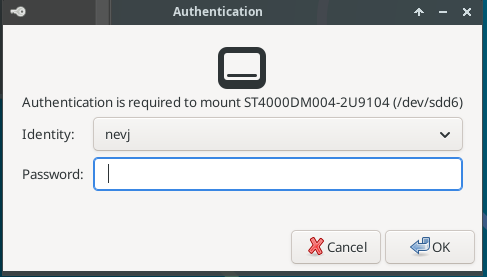
Which is correct. I can now enter my password , and the filesystem is mounted.
Success! I think I now have an Xfce in antiX which is working well enough to be a daily workplace.
Step 2 above is essential. It seems to work without Step 1, but I cant see why… if polkitd is controlling internal disk mounts it must have a rule… maybe lxpolkit has taken over from polkitd … but they are both present?
root@trinity:~# ps ax | grep polkit
 2125 ?        Sl     0:00 /usr/lib/polkit-1/polkitd --no-debug
 2728 ?        Sl     0:00 /usr/bin/lxpolkit
Because setting up Xfce in antiX has involved me in a number of issues, and there are many unfamiliar concepts involved, I think I should attempt a summary of essentials for Xfce to work well in antiX.
That will happen as a new topic… there are a few things to check too.
Have you did “ sudo chown -R nevj:nevj /home/nevj “ ?
No, but that is a good idea.
The top level is OK … ie all owned by me.
Do you have any idea why lxpolkit works and polkitd does not .?
Then you are working from root?
Continuing the discussion from antiX26-rc1: grub and other issues:
lxpolkit listens for polkitd requests and displays your login pop-up!! You are running antx as root!!
No, thunar runs as nevj. It can normally do user mounts.
Another way to do a user mount is udevil mount /dev/sdx … That works, but Thunar did not work until I did those mods?
Have you did “ whoami “ ?